Blog

Tactile Indicators in Parking Lots: Improving Safety for Pedestrians
5th Oct 2026
Accessibility isn't charity - it's dignity engineered into surfaces. – Thomas Schwartz, Tactile Solution Canada
It was 8:17 AM when Emma, a marketing director navigating Toronto's Financial District with her white cane, misjudged a curbless parking lot transition. A delivery van's screeching brakes became her wake-up call - and the property manager's.
Fast-forward six months: That same lot now features guidance bars guiding users to elevators and truncated domes defining accessible stalls. The result? Pedestrian incidents dropped to zero, while monthly parking pass sales increased by a huge number.
This transformation story isn't unique - it's replicable. Let's explore how tactile indicators turn parking lots from liability landscapes into accessible pathways that safeguard lives and livelihoods.
Why Parking Lots Demand Tactile Intelligence?
The Hidden Risks of "Naked" Parking Spaces
Parking areas blend competing priorities:
- Vehicles maneuvering at odd angles
- Pedestrians navigating with varied mobility
- Seasonal hazards (ice, snow, rain)
- Complex wayfinding needs
Without tactile indicators, these spaces become minefields for:
- Visually impaired individuals missing curb transitions
- Elderly pedestrians tripping on uneven surfaces
- Parents with strollers struggling to identify safe crossings
- Property owners facing lawsuits from preventable accidents
Standards for Accessible Parking Areas in Canada
The barrier-free design requirements for parking facilities stem from national and provincial building regulations focused on accessibility, including:
- Accessibility for Ontarians with Disabilities Act (AODA)
The AODA sets standards for customer service, employment, transportation and public spaces so Ontario becomes fully accessible by 2025. Parking forms a key aspect.
- Canadian Standards Association (CSA) B651
As Canada's benchmark for accessible design, CSA B651 covers tactile surfaces, signage, space allowances, and slope requirements for outdoor pedestrian areas.
- National Building Code of Canada (NBC)
This national model code promotes health, safety, accessibility, and resilience in the built environment. Section 3.8 specifically addresses accessible parking requirements countrywide.
- Municipal Regulations
Many cities also enforce additional accessible parking bylaws and winter city design practices to address local climate impacts on aging infrastructure.
Tactile Solutions Tailored to Parking Facility Needs
With a firm grasp of potential risk areas and relevant accessibility regulations, we can now explore compliant tactile solutions purpose-built for diverse parking lot applications.
Accessible Vehicle Spaces
Dedicated accessible spaces require:
- Tactile attention indicators (truncated domes) along parking space access aisles to define a safe walking route and demarcate curbs
- Compliance with dimensional guidelines
- Connections to accessible building entrances through wide marked crosswalks
Pedestrian Crossings
Crosswalks warrant:
- Tactile attention indicators spanning the full crossing width to designate a safe walking path separate from driving lanes
- Pedestrian crossing signs positioned at corners within sight of those crossing
- Reflective additive in tiles to reflect headlights at night for added visibility
Public Transit Platforms
For bus stops, streetcars, and train platforms:
- The full length of boarding platform edges should integrate detectable warning tiles
- Nearby rail crossings also would feature tactile attention indicators
- Shelters must have appropriate floor space and Feature rectangular bars to guide passengers along platforms
Stairwells and Ramps
Any staircases between parking areas and buildings require:
- Tactile attention indicators at stair tops and bottoms to indicate level changes
- Compliant handrails with high color contrast extending past the top and bottom stairs
- Grooved concrete or tactile strips on ramps to boost traction, plus handrails
Given these diverse functional needs, durable cast iron tiles or surface-applied polymer options provide the necessary compliance. Proper installation also proves critical.
Tactile Solutions That Outperform Canadian Weathers
Tactile Solution Canada's top-rated systems for harsh climates:
1. Armor Tile Tactile System
- Material: Engineered polymer composite
- Best For: High-traffic retail parking lots
- Advantage: UV-stabilized surface resists salt corrosion
2. Advantage Cast Iron Tactiles
- Material: ASTM A48 Class 35B Grey Iron
- Best For: Municipal lots with heavy plow traffic
- Advantage: 12mm height remains detectable under snow
3. Elan Porcelain Tactiles
- Material: Anti-slip porcelain
- Best For: Upscale office complexes
- Advantage: Near-zero water absorption prevents buildup
Return on Investment from Upgrading to Inclusive Infrastructure
Constructing fully accessible parking facilities represents much more than just legal box-checking. When implemented thoughtfully, functional tactile wayfinding unlocks value for multiple stakeholder groups:
- Municipalities – achieve climate resilience objectives while supporting aging-in-place population needs and demonstrating leadership in equitable community building.
- Developers – elevate property prestige and pricing with universally welcoming projects appealing to investors, tenants, and residents alike.
- Businesses – expand clientele reach by accommodating diverse socio-economic profiles rather than limiting demographics.
- Institutions – fulfill educational mandates and social responsibility commitments by enabling visitors of all abilities.
Tactile manufacturers also share insights, so end-users provide continual feedback, translating into design improvements over subsequent product generations.
This reflective circle illustrates how upgrading to inclusive parking infrastructure based upon accessibility legislation produces returns beyond just compliance itself.
Creative Touches Advancing Towards Inclusive Excellence
Building upon standard regulations as springboards rather than constraints, forward-thinking planners around Canada incorporate thoughtful tweaks enhancing accessibility in parking areas:
- Color Contrasts – Alternating surface colors plus bright detectable tiles assist users with low vision by better-defining changes in elevation or delineating pedestrian spaces.
- Shelters & Rest Areas – Providing regular seating and rest spaces with protection from the elements enables people of all abilities to complete longer walks from transit stops or mobility vans.
- Heated Surfaces – Electrical heating grids or heated pavement tactics, especially where tactile tiles are installed, prevent snow and ice accumulation in winter that would otherwise render markings invisible.
- Smart Technologies – Integrating proximity sensors, pavement embedded LED guide lights activated by pedestrians or audio cues from mobile apps can dynamically guide travelers along pathways to doors.
By creatively building upon compliance requirements through inclusive design principles, parking environments evolve into inviting people-centered spaces rather than afterthought asphalt oceans prioritizing only vehicles. The rewards of investing into accessibility also flow both ways...
Final Words: Where Safety Meets Social Conscience
Picture two parking lots:
- Lot A: Cracked asphalt, faded lines, invisible hazards
- Lot B: Glowing Ecoglo paths, tactile boundaries, proud "CSA Certified" signage
One repels tenants and risks lawsuits. The other becomes a community asset that literally rolls out the welcome mat for all.
In Canada's journey toward 2040's Accessible Canada Act goals, parking lots aren't just infrastructure - they're the first handshake between your property and its visitors. With strategic tactile investments, that handshake says, "We value every person's right to arrive safely."
Ready to transform your parking lots from liability to legacy?
Call or Email Us: 1-877-761-5354, csc@csc-inc.ca

How Tactile Solutions Improve Accessibility in Commercial and Public Spaces
25th Sep 2026
Creating accessible public and commercial spaces requires more than ramps and accessible entrances. People who are blind or have low vision often rely on tactile information to navigate their surroundings, identify hazards, and understand changes in pedestrian routes.
Tactile solutions provide physical and visual cues that can make commercial buildings, sidewalks, transportation facilities, shopping centres, educational institutions, and other public spaces safer and easier to navigate.
What Are Tactile Solutions?
Tactile solutions are accessibility products that use raised surfaces, patterns, textures, and visual contrast to communicate important information to pedestrians. They can help people with vision loss identify hazards, changes in elevation, pedestrian routes, and other features within the built environment.
Tactile Walking Surface Indicators (TWSIs) are commonly used to provide this information through surfaces that can be detected with a mobility cane or underfoot. When properly selected and installed, tactile indicators can form an important part of an accessible pedestrian environment.
Types of Tactile Walking Surface Indicators
Different types of tactile indicators serve different purposes. Choosing the appropriate system depends on the location, surrounding environment, pedestrian traffic, and applicable accessibility requirements.
Tactile Warning Indicators
Tactile warning indicators alert pedestrians to potential hazards or significant changes in the pedestrian environment. They are commonly used near:
- Stairways and ramps
- Pedestrian crossings
- Platform edges
- Changes in elevation
- Other potential hazards
Raised truncated dome patterns are commonly used for tactile warning surfaces because their distinctive texture can provide detectable information underfoot or with a mobility cane.
Tactile Directional Indicators
Directional tactile indicators use linear or bar-shaped patterns to communicate directional information. They can help guide pedestrians through complex environments where visual signs alone may not provide sufficient information.
These indicators can be particularly useful in large public facilities where pedestrians may need additional cues to follow designated routes.
Where Are Tactile Solutions Used?
Tactile accessibility products can be incorporated into a wide range of public, commercial, and institutional environments.
Commercial and Retail Spaces
Shopping centres and retail properties contain entrances, stairs, ramps, parking areas, and other pedestrian routes. Tactile warning indicators can help identify potential hazards and support accessible navigation throughout these spaces.
Retail environments may also include decorative lighting features such as Tiffany wall sconces, which can be incorporated alongside carefully planned tactile accessibility features without compromising the overall interior design.
Transportation and Public Areas
Transportation facilities often contain platforms, crossings, stairs, ramps, and changes in elevation. Tactile warning systems can provide important physical cues around designated hazard areas and help people with vision loss navigate busy pedestrian environments.
Because these locations experience heavy pedestrian traffic, durability, slip resistance, weather exposure, and ongoing maintenance should be considered when selecting tactile products.
Educational and Institutional Buildings
Schools, universities, healthcare facilities, libraries, and other institutions can use tactile indicators around entrances, stairs, ramps, and pedestrian routes to create more accessible environments.
Installing tactile systems as part of a wider accessibility strategy can help make frequently used areas easier to navigate for people with different levels of vision.
Choosing the Right Tactile Products
The right tactile product depends on several factors, including the installation environment, substrate, pedestrian traffic, weather exposure, expected usage, and project requirements.
Before installation, project teams should consider the characteristics of the existing surface and determine which tactile system is appropriate for the application.
Surface-Applied Tactile Indicators
Surface-applied tactile systems can be suitable for retrofit projects where removing existing flooring or concrete is not practical. They can provide accessibility improvements while reducing disruption to an operating facility.
These systems may be useful when an existing commercial or public space needs accessibility upgrades without extensive reconstruction.
Cast-In-Place Tactile Indicators
Cast-in-place systems are installed during concrete construction and become integrated into the finished surface. They can be particularly suitable for new construction and major redevelopment projects.
Selecting the appropriate installation method during the planning stage can help ensure that tactile indicators are properly positioned and integrated into the overall pedestrian route.
Why Visual Contrast Matters
Tactile accessibility is not limited to physical texture. Visual contrast can also make tactile indicators easier to identify for people with partial sight.
When selecting tactile products, project teams should consider:
- Colour contrast
- Surrounding flooring
- Lighting conditions
- Product finish
- Surface visibility
- Applicable accessibility requirements
Decorative interior elements such as Tiffany table lamps can remain part of an interior design concept while tactile indicators provide essential accessibility information where required.
Maintaining Tactile Indicators
Regular inspection and maintenance help preserve the performance of tactile accessibility systems. Facility managers should periodically check for:
- Loose or damaged indicators
- Worn or damaged tactile patterns
- Dirt and debris buildup
- Reduced visual contrast
- Damaged surrounding surfaces
- Obstructions covering tactile areas
Proper installation combined with routine inspection and maintenance can help tactile systems remain functional, visible, and durable over time.
Creating More Accessible Spaces With Tactile Solutions
Tactile solutions play an important role in creating safer and more accessible public, commercial, transportation, and institutional environments. From tactile warning indicators to directional tactile systems, these products provide valuable physical and visual information for people who are blind or have low vision.
With appropriate product selection, professional installation, and ongoing maintenance, tactile accessibility systems can become an effective part of a comprehensive accessible design strategy.
When accessibility is considered during the planning and development of a space, tactile solutions can help create pedestrian environments that are easier to understand, navigate, and use for everyone.

A Proper Comprehensive Guide on Wayfinding Tiles
23rd Sep 2026
Creating accessible and navigable spaces is crucial, especially for visually impaired individuals. Wayfinding tiles enhance accessibility by providing non-visual cues to guide users safely through public areas.
This comprehensive guide will explore what wayfinding tiles are, their significance, types, applications, installation, and codes & standards concerning wayfinding tiles in Canada.
What Are Wayfinding Tiles?
Wayfinding tiles, also known as directional tiles or tactile guidance tiles, are specialized tactile walking surface indicators (TWSIs) designed to assist visually impaired individuals in navigating safely in public spaces.
These tiles contain raised bars that can be felt underfoot or by a cane. The bars are oriented in the direction of travel, providing a tactile cue for path navigation. Wayfinding tiles are installed in large open spaces to define accessible routes from point A to B for the visually impaired.
The Importance of Wayfinding Tiles
For individuals with visual disabilities, navigating unfamiliar, expansive spaces can be challenging. Wayfinding tiles provide an invaluable and accessible means of facilitating independent mobility.
Some key benefits of wayfinding tiles include the following:
- Provide a safe path for the visually impaired to navigate large open spaces confidently. The tactile bars guide users along the correct route.
- Enable accessible navigation without reliance on other aids like sighted guides or canes, which may not be available.
- Allow visually impaired individuals to develop a mental map of spaces by feeling the tile patterns underfoot, enhancing their spatial awareness and independence.
- Help avoid disorientation and accidents by providing a detectable delineated path. Wandering into dangerous areas is prevented.
- Meet code compliance for accessible route wayfinding in public spaces per standards like the AODA.
Overall, wayfinding tiles crucially enhance accessibility, safety, and independence for blind or low-vision users in environments like transit stations, shopping malls, offices, etc.
Types of Wayfinding Tiles
Wayfinding tiles are available in various materials, sizes, colors, and installation formats. Common options include:
- Cast-In-Place Wayfinding Tiles: Provide a durable wayfinding solution installed directly into fresh concrete.
- Surface-Applied Wayfinding Tiles: Affix on existing hard surfaces using adhesive. Ideal for renovation projects.
- Metal Tiles: Robust metal tiles like stainless steel, cast iron, and aluminum. Withstand heavy footfall.
- Individual Embedded Bars: Single bars screwed into existing surfaces. For limited small-scale applications.
Wayfinding Tile Applications
Wayfinding tiles have diverse applications across indoor and outdoor settings, including:
Indoors:
- Lobbies and Atriums
- Airports and Transit Stations
- Retail Spaces like Malls and Department Stores
- Auditoriums and Theaters
- Hotels
- Government Buildings
- Information desks
Wayfinding tiles can be installed along accessibility routes leading from entryways to key destinations like information desks, elevators, escalators, stairs, transit platforms, etc. They provide continuous tactile guidance throughout the space.
Wayfinding Tile Design Specifications
For optimal effectiveness, wayfinding tiles must adhere to certain specifications per accessibility guidelines and codes. Key specifications include:
- Bar Size: Height of 4-5mm and width of 17mm-30mm. Larger diameter bars are easier to detect.
- Length: At least 270mm to provide adequate underfoot detection.
- Bar Spacing: Spacing between 12mm-61mm based on bar size. Larger bars require greater spacing.
- Bar Layout: This should be parallel and aligned perpendicular to the direction of travel.
- Detectable Color Contrast: Should visually contrast with surrounding flooring for partially sighted individuals.
- Material: Durable and slip-resistant.
- Installation: Bars must be flush with the surrounding floor.
- Size: A minimum width of 0.6m for the tile runs.
Codes and Standards for Wayfinding Tiles in Canada
Several crucial regulations and standards concerning wayfinding tiles must be complied with in public installations in Canada. These include:
- Accessibility for Ontarians with Disabilities Act (AODA): Mandates detectable wayfinding tiles along accessible routes in all public spaces.
- CSA B651: Provides standards for wayfinding TWSI dimensions, materials, installation, color/brightness contrast, etc.
- National Building Code of Canada: References CSA standards and addresses wayfinding system needs for buildings.
- Ontario Building Code: Prescribes wayfinding tile requirements complementary to national codes.
- Local Municipality Guidelines: Some municipalities, like Toronto, have additional standards for wayfinding tile placement and maintenance.
Installing compliant wayfinding tiles per all relevant codes ensures accessibility obligations are legally met. Non-compliance can result in heavy penalties and lawsuits.
Installing Wayfinding Tiles
Proper installation is vital for wayfinding tiles to function effectively. Here are some best practices to follow:
- Select an Appropriate Product: Consider factors like application, traffic, safety, costs, and aesthetics.
- Follow Manufacturer Instructions: Refer to product manuals for setting, orientation, adhesive use, etc.
- Ensure Proper Tile Alignment: Bars must be aligned perpendicular to the travel direction with appropriate gapped spacing.
- Maintain Consistency: Follow consistent spacing, color, and pattern throughout the facility.
- Provide Color Contrast: Choose colors that visually contrast with flooring for maximum visibility.
- Ensure flush installation: Wayfinding tiles should have minimal edge elevation or lippage with the surrounding floor.
- Perform Maintenance Checks: Regularly inspect for damaged, missing or uplifted tiles that could impede use.
Proper installation Alignment perpendicular to route direction, flushness with the floor, high color/brightness contrast, and ongoing maintenance are vital for optimizing wayfinding tile functionality.
FAQs
What materials are wayfinding tiles commonly made of?
Wayfinding tiles use various durable and slip-resistant materials like polymers, metals (stainless steel, cast iron, aluminum), rubber, and porcelain.
What are the key codes and standards for wayfinding tiles in Canada?
The principal regulations are the Accessibility for Ontarians with Disabilities Act (AODA), CSA B651, the National Building Code of Canada, provincial building codes like the Ontario Building Code, and relevant municipal bylaws.
How often should maintenance be performed on wayfinding tiles?
Wayfinding tiles should be regularly inspected for damage or uplift, with prompt replacement of defective tiles. Daily sweeping and spot mopping keep tiles free of dust/debris accumulation.
How do wayfinding tiles differ from truncated dome tiles?
Truncated domes provide warnings of upcoming hazards, while wayfinding tiles contain directional bars or cones to guide users along an intended pedestrian circulation path.
Conclusion
Wayfinding tiles provide a tactile navigation channel for the blind and visually impaired, enabling accessible mobility in complex environments. By consulting codes and standards, selecting appropriate products, and following best practices for installation, maintenance, and usability testing, facility owners and contractors can integrate wayfinding tiles to create inclusive public spaces that accommodate all users. This comprehensive guide covered the critical aspects of wayfinding tiles, from significance and design to installation and compliance. Leverage the insights provided to make wayfinding tiles a key component of accessibility and universal design in your next public space project.

Understanding Canadian Accessibility Codes: AODA, CSA B651, NBC, IFC
23rd Sep 2026
Accessibility is a fundamental human right that allows people with disabilities to participate fully in society. In Canada, various laws and regulations at the federal, provincial, and municipal levels aim to make public and private spaces accessible.
For those involved in construction, renovation, or facility management, understanding the critical accessibility codes is crucial to ensure compliance. When it comes to tactile warning systems that assist the visually impaired, some essential standards and regulations apply across Canada. Let’s explore the most important ones.
AODA – Leading the Way to Accessibility in Ontario
The Accessibility for Ontarians with Disabilities Act (AODA) is a landmark provincial legislation passed in 2005. Its goal is to make Ontario fully accessible for people with disabilities by 2025.
AODA standards set accessibility requirements in 5 key areas:
- Customer Service
- Information and Communications
- Employment
- Transportation
- Design of Public Spaces
The Design of Public Spaces standard directly relates to tactile warning systems. It covers technical specifications for public spaces like:
- Recreational trails
- Outdoor play areas
- On and off-street parking
- Service counters and queuing areas
- Maintaining public spaces
For contractors, the AODA Design of Public Spaces standard legally mandates installing compliant tactile warning systems in indoor and outdoor public spaces. This makes AODA the foremost accessibility regulation in Ontario to consult for tactile projects.
CSA B651 – The Benchmark for Tactile Warning Systems
The CSA Group develops standards incorporated into Canada’s National Building Code (NBC). When it comes to tactile warnings, CSA B651 is the authority.
This comprehensive standard specifies the technical requirements for tactile walking surface indicators (TWSIs). It provides guidelines on:
- Dome/cone size and spacing
- Bar dimensions and layouts
- Appropriate TWSI installation locations
- Visual and tactile detectability
- Materials and slip resistance
CSA B651 is aligned with global standards like ISO 23599 on tactile walking surfaces. By adhering to CSA B651, contractors can be assured that their tactile installations will meet strict dimensional, durability, visual contrast, and placement regulations.
National Building Code of Canada – Minimum Accessibility Standards
Canada’s National Building Code (NBC) sets out technical provisions for constructing new buildings and renovations. It references vital accessibility requirements from CSA standards on tactile warning surfaces.
The NBC demands a minimum level of accessibility in all new construction and renovations through features like:
- Barrier-free interior routes
- Visual fire alarms
- Washroom Accessibility
- Assistive listening systems
Meeting NBC requirements necessitates installing compliant tactile warning systems at specific locations. Being the national benchmark, the NBC is a crucial code for tactile installations.
Provincial and Municipal Building Codes – Local Accessibility Rules
Alongside the national standards, provincial and municipal building codes contain additional accessibility rules tailored to local needs.
For example, Ontario’s Building Code specifies supplementary requirements for new construction and renovations in the province. It adopts the NBC’s accessibility provisions and CSA tactile surface standards.
Municipalities like Toronto also issue their building code requirements and facility access standards. These local codes should be cross-checked to ensure complete compliance.
International Fire Code (IFC) – Life Safety through Photoluminescence
The IFC contains provisions related to fire safety in new and existing buildings. Section 1024 on Luminous Egress Path Markings mandates photoluminescent markings to delineate exit paths in many occupancy types.
Photoluminescent wayfinding strips, stair nosings, handrails, and door exit signs aid safe evacuation during fire emergencies by remaining illuminated even when lighting fails. IFC-compliant photoluminescent tactile systems can be crucial to creating a compliant facility per the code’s life safety objectives.
Barrier-Free Design Standards – Federal Guidelines
The Barrier-Free Design Standards issued by Public Services and Procurement Canada apply to federal buildings like post offices, border crossings, etc. These standards align with CSA requirements and provide schematics, drawings, and specifications related to accessibility.
Tactile warning strip standards are provided for stairs, pedestrian crossings, platform edges, etc. Adherence to these federal standards is mandatory for construction and renovations initiated by Public Services and Procurement Canada.
How Tactile Solution Canada Can Help Meet Codes?
As Canada’s premier accessibility solutions provider, Tactile Solution Canada partners with architects, contractors, and facility managers to integrate compliant tactile systems in projects across sectors. Our product portfolio includes trusted solutions like:
- Access Tile® Detectable Warning Systems
- Armor Tile® Tactile Systems
- Advantage® Tactile Systems
- Elan Tile® Tactile System
- Eon Tile® Tactile System
- Ecoglo® Photoluminescent Wayfinding Systems
These industry-leading solutions are:
- Engineered to meet CSA B651, ISO, and AODA standards
- Customizable for any public space context
- Easy to install, durable and weather-resistant
- Compliant with local and national building codes
By consulting us early in your project, we can recommend optimal tactile solutions to fulfill Canadian accessibility regulations and protect from risks of non-compliance.
Frequently Asked Questions
What are some essential accessibility laws in Canada?
The primary federal, provincial, and local accessibility laws are provincial building codes, CSA standards, municipal bylaws, and the National Building Code of Canada.
Where are tactile warning systems needed?
Key areas are transit platforms, curb ramps, building entrances, commercial washrooms, stairs, pedestrian crossings, and parking areas.
What material options work best for outdoor tactile systems?
Durable metal, engineered polymer, and porcelain tactile suit heavy-duty exterior use.
What maintenance is needed for tactile warning products?
High-caliber tactile warning systems require minimal maintenance beyond inspecting for damage and replacing individual damaged sections as needed.
Let Tactile Solution Canada be your partner in creating safely accessible commercial, institutional, and public environments. Get in touch with our experts to learn more about equipping your next project with code-compliant tactile warning systems specially tailored to your needs.

Transform Spaces with Tactile Warning Surface Indicators
23rd Sep 2026
Ensuring accessibility for all individuals, regardless of physical ability, is a crucial moral and legal responsibility. For visually impaired persons, in particular, navigating the built environment poses daily challenges that most sighted individuals take for granted.
Tactile warning surface indicators (TWSIs), also known as detectable warning surfaces, provide a vital communication channel between public infrastructure and individuals with visual disabilities. Composed of standardized textured ground surfaces, TWSIs convey essential information non-visually through the sense of touch.
As per Canadian accessibility legislation like the Accessibility for Ontarians with Disabilities Act (AODA), integrating TWSIs in various indoor and outdoor public spaces is mandatory. When thoughtfully implemented, these ingenious surfaces enhance accessibility and quality of life for millions of Canadians.
Understanding TWSIs
TWSIs feature distinctive surface patterns that are easily detectable underfoot or by a cane. Two main types exist:
Attention TWSIs:
These indicate potential hazards like the edge of a platform or oncoming vehicular traffic. The typical configuration is truncated domes organized in a square or radial pattern.
Wayfinding TWSIs:
These provide directional cues to guide pedestrians along designated walking paths. Common configurations are raised bars, cones, or grooves running parallel to the direction of travel.
Applications of TWSIs Indoors
The thoughtful integration of TWSIs enhances indoor accessibility and safety for the visually impaired. Key applications include:
- Transit Platform Edges: Prevent accidental slips and falls.
- Escalator Approaches: Alert of upcoming moving staircase.
- Building Entrances: Mark doorway thresholds.
- Ramps and Stairwells: Warn of elevation change.
- Information Kiosks: Guide to customer service points.
- Corridors: Define walkways through expansive spaces.
- Lobbies: Direct to reception, elevators, and exits.
- Aisles: Help navigate large open retail floors.
Proper interior placement is crucial - too few can leave dangerous gaps in information, while overuse can cause clutter and confusion. When thoughtfully distributed, indoor TWSIs foster confidence, independence, and security.
Applications of TWSIs Outdoors
Outdoor public realms present even greater navigational challenges. Proper TWSI integration enhances outdoor accessibility by:
- Signaling Crosswalks: Define pedestrian right-of-way at intersections.
- Curb Ramps: Mark transition from sidewalk to street.Stairs and Ramps: Warn of elevation changes.
- Parking Areas: Guide to meter payment points.
With outdoor TWSIs, regular maintenance is key, as exposure can degrade materials over time. Fortunately, their durable materials offer excellent longevity even in harsh conditions.
Indoor Tactile Products
- Eon Tile - Made of durable, flexible rubber material. Provides attention and directional indicators. Suitable for high-traffic environments like shopping centers and hospitals.
- Elan Tile - Porcelain-based tactile tiles for attention and wayfinding. Exceeds durability standards. Aesthetically pleasing.
- Armor Tile System - Polymer composite tiles compliant with accessibility codes. Available as cast-in-place or surface-applied. Highly customizable.
- Access Tile - Engineered polymer tiles that are lightweight and easy to install. Replaceable and surface-applied options. Industry-leading durability.
- Advantage Tactile Systems - Elegant stainless steel tactile plates for indoor applications. Stamped with anti-slip texture.
- Fire-Resistant Tile - Special composite tactile tile resistant to flames and smoke. Meets Ontario Fire Code for high-rise buildings.
Outdoor Tactile Products
- Armor Tile System - Fully compliant detectable warning tiles. Withstand weather conditions and heavy loads. Available in many sizes.
- Access Tile - Replaceable and surface-applied tiles of durable polymers. Resilient against weather and wear.
- Advantage Tactile Systems - Heavy-duty metal tactile tiles for high-traffic outdoor use. Engineered for long-lasting performance.
- Eon Tile - Flexible rubber tactile pavers suitable for retrofits. Available with truncated domes or directional bars.
- Elan Tile - Porcelain-based tactile tiles made of premium materials. Use indoors and outdoors.
- Cast Iron Tactile Tiles - Robust Cast-iron tiles embeddable in concrete. Withstand abuse from vehicles and weather.
- Stainless Steel Domes & Bars - Individual outdoor domes and bars screwed into surfaces. Permanent anti-slip texture.
Benefits of TWSIs for Users
The benefits of thoughtfully installed TWSIs for visually impaired Canadians are immense, including:
- Improved Spatial Awareness: TWSIs provide a mental map of the surrounding environment.
- Enhanced Mobility: Independence and confidence to navigate unfamiliar spaces.
- Reduced Hazards: Warning of potential dangers like busy roads.
- Active Lifestyle: Encourages engagement with community and public spaces.
- Equity: Equal right to utilize public resources safely.
Ultimately, TWSIs allow full participation in society and provide a lifeline to accessibility.
Benefits of Installing TWSI in Public and Private Spaces
Beyond the user perspective, TWSIs also benefit the owners and operators of public and private spaces in key ways:
- Legal Compliance: Adherence to accessibility legislation like the AODA.
- Injury Reduction: Limit liability from potential accidents or falls.
- Universal Design: Create inclusive spaces usable by all.
- Corporate Social Responsibility: Demonstrate a commitment to accessibility.
- Competitive Edge: Meet consumer demand for accessibility.
By investing in proper TWSI integration, organizations show they genuinely care about inclusivity - an ethos that appeals to conscientious consumers.
Best Practices for TWSI Implementation
To maximize the benefits of TWSIs for all, consider the best practices:
- Consult Local Guidelines: Adhere to municipal standards for appropriate TWSI placement.
- User Testing: Incorporate feedback from visually impaired users post-installation.
- Consistency: Maintain uniform tactile patterns across locations.
- Maintenance: Regularly inspect and repair deteriorating surfaces.
With thoughtful design, diligent installation, and proper maintenance, the impacts of TWSIs on accessibility and inclusivity will continue growing for decades to come.
FAQs
What is the purpose of tactile ground surface indicators?
Tactile ground surface indicators provide detectable tactile cues to assist visually impaired pedestrians in navigating public spaces safely and independently. Key purposes include signaling hazards and providing directional guidance.
What are tactile ground surface indicators TGSI or tactile wayfinding and warning tiles used for?
These textured ground surface indicators serve two main functions - warning pedestrians about upcoming hazards like curbs or stairs and guiding pedestrians along designated walking paths in large open spaces.
What are warning tactile ground surface indicators?
Warning tactile ground surface indicators use distinctive surface patterns like truncated domes to signal upcoming hazards to pedestrians with visual disabilities. This alerts them to dangers like curbs, platform edges, vehicle areas, or stairs.
Conclusion
In our complex urban landscapes, seamless public accessibility requires careful infrastructural planning. For pedestrians with visual impairments, the integration of Tactile Warning Surface Indicators (TWSIssss) provides an indispensable communication channel to the built environment. Indoors and out, proper TWSIs placement promotes confidence, independence, and security during daily life.
By investing in compliant, durable, thoughtfully distributed TWSIs, businesses and urban planners take an essential step towards a Canada without barriers. At Tactile Solution, we provide reliable, superior-quality TWSIs not only meet but surpass all pertinent regulations and specifications. We offer a variety of colors, shapes, and sizes to meet the specific needs of each project.

Best Porcelain Tactile Tile Products for Commercial Spaces & Office Lobbies
20th Mar 2026
The best porcelain tactile tile products for commercial spaces and office lobbies are the Elan Tile Porcelain Attention Domes and Porcelain Wayfinding Bar Tile. These certified porcelain stoneware tiles offer the heavy-duty safety required by Canadian accessibility codes while perfectly matching the high-end aesthetic of natural stone or premium floors. Building owners and contractors choose these specific products because they provide a permanent, AODA-compliant solution for visually impaired pedestrians without compromising the professional design of a luxury interior.
At Tactile Solution Canada, we hear this concern daily. Today, we are exploring the ultimate solution to this design dilemma. We will walk you through the very best porcelain tactile tile products on the market, proving that you can absolutely maintain a sophisticated aesthetic while achieving full compliance with Canadian accessibility codes.
The Premium Choice: Introducing Elan Porcelain Tactile Indicators
When standard polymer or rubber tiles simply do not fit the design brief of a museum, corporate lobby, or high-end retail flagship, industry professionals turn to the Elan Tile line.
This is not your average ceramic product. Elan Tile is officially certified as "Porcelain Stoneware", meaning it far exceeds the strict EN 14411 standard. These tiles are engineered from the finest raw materials in the industry to provide a highly compact, full-body porcelain surface. This unique manufacturing process results in extremely low water absorption and unmatched surface hardness.
"Accessibility should feel integrated, not added on. It is about creating spaces where safety and architectural style walk hand in hand." - Thomas Schwartz
You get the perfect balance. You receive the robust functionality of heavy-duty tactile warning surface indicators, wrapped in a sleek, premium finish that blends harmoniously with your existing architectural design.
Elan Tile Porcelain Attention Domes: The Quiet Bodyguards
Every commercial space has potential physical hazards. If there is an unprotected drop-off, the edge of a decorative reflecting pool, or the top of a grand escalator, you need to warn pedestrians before they step into danger.
This is where the Elan Tile Porcelain Attention Domes comes into play. These tiles feature a precise array of truncated attention domes that act as a physical stop sign for people relying on a white cane or underfoot sensation.
Why Elan Tile Shine in Commercial Spaces?
- Aesthetic Integration: Because they are made of high-quality porcelain, they do not look like cheap safety gadgets. They create a defined hazard zone that looks completely intentional within your floor plan.
- Unmatched Durability: The full-body porcelain is practically impervious to stains, water, and harsh cleaning chemicals used by janitorial staff.
- Slip Resistance: They feature an advanced R11 finish. This meets the most demanding slip resistance requirements for high traffic areas, keeping everyone safe even on a rainy Canadian morning.
Elan Tile Porcelain Wayfinding Bars: The Tactile GPS
While attention domes warn of danger, wayfinding bars provide essential directional guidance. If you manage a large open floor plan like a shopping mall, an airport concourse, or a sprawling convention center, visually impaired visitors need a clear, safe path to follow.
The Elan Tile Porcelain Wayfinding Bars acts as a continuous, tactile trail through these complex environments.
Guiding the Way Effectively
- Creating Safe Routes: These directional tactile walking surface indicators are laid end-to-end to lead pedestrians from main entrances directly to essential destinations like information kiosks, elevators, or reception desks.
- Consistent Format: Just like the attention domes, these tiles come in a standard 12" x 12" size with a 10mm thickness. This identical format makes layout planning and installation incredibly straightforward for your contracting team.
- Weather Defiant: Thanks to their exceptional resistance to thermal shock, frost, and deep abrasions, these porcelain bars perform flawlessly in both interior and exterior environments.
Ensuring Code Compliance Without Compromising Style
The biggest worry for any building owner is failing a strict accessibility inspection. You want a beautifully styled commercial space, but public safety is the ultimate priority.
Both the Elan Porcelain Attention Domes and the Wayfinding Bars are fully Canadian Accessibility code-compliant. When installed correctly by your contracting team, they help your facility meet the rigorous safety standards set by:
- The Accessibility for Ontarians with Disabilities Act (AODA)
- The CSA B651 Accessible Design for the Built Environment standard
- The National Building Code of Canada (NBC)
- The ISO 23599 international standard
A crucial part of these codes is luminance contrast. The tactile tiles must visually stand out from the surrounding floor so partially sighted individuals can easily spot them. By offering sophisticated standard colours like Cultured Grey, Vogue Black, and Sand Stone, Elan Tile allows designers to achieve the necessary visual contrast while still matching the surrounding architectural color palette perfectly.
The Smart Investment for Long-Term Value
Upgrading a commercial space is a massive financial commitment. While standard surface-applied plastics might have a lower initial sticker price, they often require costly replacement after years of heavy foot traffic or aggressive floor scrubbing.
Elan Tile porcelain products are a long-term investment. Their resistance to deep abrasions means the tactile profiles will not wear down easily. They maintain their code-compliant height and texture for many years, supported by a solid 5-year manufacturer's warranty. For a property manager, this translates to fewer maintenance headaches and a drastically lower total cost of ownership over the life of the floor.
Frequently Asked Questions about Porcelain Tactile Tiles
Can porcelain tactile tiles be installed outdoors in Canada?
Yes, absolutely. Because Elan Tile is a highly compacted porcelain stoneware with extremely low water absorption, it boasts exceptional resistance to frost and thermal shock. This makes it a fantastic, highly durable option for exterior plazas and unprotected drop-offs, even during freezing Canadian winters.
Are porcelain tactile tiles slippery when wet?
Not at all. Elan Porcelain Tactile Tiles are expertly engineered with a specialized R11 finish. This specific finish meets the most demanding slip resistance requirements for construction projects, ensuring absolute safety for all pedestrians in high traffic areas, regardless of rain or snow.
How do I choose between attention domes and wayfinding bars?
It depends strictly on the specific function of the floor area. You must use Porcelain Attention Domes Tile to warn pedestrians of an upcoming hazard, like a staircase, a curb ramp, or a sharp edge drop-off. Conversely, you should use Porcelain Wayfinding Bar Tile to create a guided, safe path through a large open space to help people reach a specific destination, like an elevator bank.
What sizes do Elan tactile tiles come in?
The standard and most versatile size for both the attention domes and wayfinding bars is 12 inches by 12 inches (covering exactly 1 square foot per tile), with a 10mm thickness. This uniform size makes them very easy to integrate into standard commercial tile grids seamlessly.
Upgrade Your Commercial Space Today
Designing a highly inclusive environment does not mean you have to sacrifice your architectural vision. With Elan Porcelain Tactile Indicators, you can confidently protect your visitors and meet strict Canadian accessibility codes, all while maintaining a sleek, modern aesthetic.
Do not let outdated safety add-ons drag down the value of your prestige property. Trust the premium choice that top contractors and designers rely on across the country. If you are ready to upgrade your facility with beautiful, durable, and compliant tactile solutions, reach out to our team at Tactile Solution Canada. We are here to help you build spaces that work beautifully and safely for everyone.

Upgrading Stairways and Exits for Maximum Safety with Accurate Products Using Our Tactile Solution Finder Tool
14th Aug 2025
Safety isn’t just a rule; it’s the heartbeat of a building that cares for everyone.
Imagine you’re heading down the stairs of your condo in Ottawa on a snowy evening, and the fire alarm suddenly blares. The lights dim, a bit of smoke creeps in, and every step feels risky. Now picture those same stairs with gentle glowing guides you can feel underfoot, quietly showing the way. That’s the kind of safety we’re passionate about at Tactile Solution Canada. As someone who’s worked with contractors, building managers, and owners across Canada, I’ve seen how small upgrades can make a big difference. Let’s talk about making your stairways and exits safer, easier to navigate, and fully compliant with Canadian standards, all in a way that feels approachable and real.
Why Upgrade Your Stairways and Exits?
Stairways are the backbone of any building, especially in emergencies, but they’re also where accidents happen. In Canada, over 200,000 people get hurt on stairs each year, often in busy spots like condos or apartments. These incidents spike in dim light or chaos, like during a power outage or fire, and they hit hardest for seniors, kids, or the 1.5 million Canadians with vision challenges. Ignoring this isn’t just unsafe; it’s unfair.
Adding Tactile Walking Surface Indicators (TWSIs) changes the game. These textured guides, like attention domes to warn of edges or directional bars to point the way, help everyone move confidently. Pair them with glow-in-the-dark features, and you’ve got a setup that shines when the lights go out, speeding up evacuations and easing worries. For building pros, this means fewer risks and tenants who feel secure and valued.
Here’s a story: A school in Edmonton struggled with chaotic fire drills until they added tactile cues. Suddenly, students and staff moved smoothly, even in pretend smoke. It showed these upgrades aren’t extras; they’re must-haves for safer spaces in real-time and the future.
Key Products to Boost Safety
Let’s dive into the tools that transform stairs into secure paths. These are tough, Canadian-code-friendly options built for our weather and needs.
- Attention Domes (Truncated Domes): These raised bumps signal hazards like stair edges or exit thresholds. Made from vitrified polymer, they stand up to snow and salt, ideal for outdoor ramps or indoor lobbies. Products like ArmorTile or AccessTile FR are fire-resistant and budget-friendly.
- Guidance Bars (Wayfinding Bars): Raised strips that guide feet or canes, perfect for open areas in hotels or offices. Bright yellow polymer bars offer slip resistance and visual contrast, ensuring smooth navigation.
- Photoluminescent Stair Nosings: These glow-in-the-dark edges mark steps clearly, even in total darkness. Ecoglo’s GREEN GLOW tech absorbs light and shines for over 70+ hours, exceeding NBC’s 60-minute requirement. They’re slip-proof, weather-tough, and last 10-15 years, cutting maintenance costs.
- Photoluminescent Exit Signs: Energy-free signs that glow after soaking up light with the same tech as stair nosing. Approved by CSA and UL 924, they outshine traditional LEDs in smoke or outages, no batteries needed.
These products come in materials like stainless steel for outdoor durability or porcelain for indoor style, letting you match your project’s look while staying compliant.
Your Go-To Helper: The Tactile Solution Finder Tool
Picking the right products can feel like a puzzle, but our Tactile Solution Finder Tool makes it simple, like chatting with a friend who knows the ropes. Visit our tactile solution finder tool, answer a few questions, and it matches products to your needs.
Here’s the process:
- Project Type: Indoor, outdoor, or both? It accounts for Canada’s tough weather.
- Installation Style: Wet concrete for new builds, surface-applied for retrofits, or recessed for high-traffic areas.
- Material Choice: Stainless steel for strength, polymer for lightness, or cast iron for extreme conditions.
- Safety Extras: Add photoluminescent signs or anti-slip strips for added protection.
In minutes, you’ll get recommendations like Ecoglo nosings for condo stairs or Armor Tile domes for exits, all aligned with AODA, CSA B651, and NBC. You’ll receive quotes, specs, drawings, and install guides within 24 hours - no stress, just solutions.
Let’s share a story: Meet Emma, a property manager in Halifax, upgrading her old apartment building. Overwhelmed by choices, she used the tool, entering “existing stairs, hazard alerts, glow needed.” It suggested guidance bars and glowing signs, and installation was a breeze. Tenants loved the safer feel, and Emma felt proud knowing she met compliance. That’s the tool’s magic - turning confusion into confidence.
Easy Tips for Installation and Care
Installing these products isn’t hard, but doing it right counts. For stair nosings, clean surfaces well, apply adhesive evenly, and align with consistent gaps per codes. Let them set before anyone walks on them for a solid bond.
For upkeep, check luminance and security yearly, keeping records for audits. Clean with gentle soap to maintain a glow, and replace worn pieces quickly. For tactile domes, lightly grind treads if needed to ensure they’re detectable by foot or cane, per ISO standards.
Quick tips:
- Prep well: Clean and dry surfaces for strong adhesion.
- Test regularly: Check visibility in low light every few months.
- Train your team: Run drills to prepare for emergencies.
These steps keep your upgrades reliable for years.
Benefits for Managers, Owners, and Pros
For building owners and managers, these upgrades are a win:
Lower Risks: Compliant features reduce accidents, avoiding fines and legal trouble.
- Attract Tenants: Inclusive spaces appeal to diverse communities.
- Save Money: Photoluminescent products cut energy and repair costs.
- Build Trust: Residents feel cared for, boosting loyalty in condos.
Contractors and landscapers benefit too - easy installs lead to happy clients and more projects. In apartments, these upgrades make daily navigation smoother, creating welcoming spaces for all.
Let’s Make Safer Spaces Together
We’ve explored how tactile domes, glowing nosings, and smart tools like the Tactile Solution Finder turn stairways and exits into safe, inclusive paths. It’s not just about meeting codes; it’s about building spaces where everyone feels secure, even in tough moments. Picture your building as a trusted guide, lighting the way when it matters most.
Ready to take the next step? If you’re a contractor, manager, or owner, let’s work together to create safer, brighter spaces. Reach out today - we’re here to help you make a difference.
Top 5 Benefits of Tactile Warning Systems for Visually Impaired
5th Jul 2024
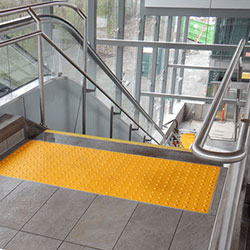
Over 1.5 million Canadians are visually impaired, and an estimated 5.59 million more have sight loss causing eye disease. For these individuals, navigating public spaces can be challenging and unsafe without proper accessibility accommodations. Tactile warning systems provide an invaluable service by alerting visually impaired pedestrians to potential hazards and guiding their movement through the built environment.
As a leading Canadian supplier of tactile warning systems, Tactile Solution Canada is committed to enhancing accessibility and mobility for the visually impaired. We offer a wide selection of tactile warning products, including detectable warning surfaces, wayfinding indicators, and exit signs. Our systems are designed to meet the latest accessibility standards and codes in Canada.
Here are the top 5 benefits of using tactile warning systems for visually impaired Canadians:
1. Prevent Accidents and Injuries
Tactile warning surfaces like truncated domes alert visually impaired individuals to upcoming hazards like stairs, ramps, level changes, and road crossings. The unique texture is easily detected by a person's feet or cane, warning them to stop, slow down, or proceed with caution. This helps prevent potentially dangerous falls or collisions. Proper use of tactile warnings has been proven to reduce accidents among visually impaired pedestrians.
2. Guide and Orient Users
Wayfinding indicators like raised bars guide users along a set path or route. These tactile cues help visually impaired Canadians navigate safely through open spaces, transit platforms, and complex building interiors where maintaining a straight path is difficult. Wayfinding strips provide confidence for independent travel.
3. Promote Accessibility
Tactile systems allow visually impaired citizens to access and utilize public spaces in their community. With proper installations that meet guidelines like the CSA B651 Standard in Canada, visually impaired individuals can travel safely and comfortably through areas like sidewalks, stairways, parks, transit stations, and information centers. Tactile warning systems are a key accessibility accommodation required under the Canadian Human Rights Act.
4. Support Independence
For many visually impaired Canadians, the ability to travel independently is linked to quality of life. Tactile warning systems give users the confidence to navigate their environment without constant reliance on sighted guides. This allows for greater autonomy and freedom in everyday tasks. Mobility and independence are critical factors for mental health and social participation.
5. Provide Consistency
Standardized tactile warning systems give visually impaired travelers consistency across different cities and provinces. For example, a truncated dome surface alerts a user to the edge of a train platform whether they are in Toronto, Vancouver, or Moncton. Consistent tactile cues allow for intuitive understanding and safe travel regardless of location. It also streamlines accessibility for organizations that operate across Canada.
Proper Installation is Critical
While tactile warning systems offer immense benefits, their effectiveness depends greatly on proper installation and maintenance. Here are some key considerations:
- Positioning – Tactiles should be logically placed at hazardous spots or decision points along a route. Follow all measurements outlined in Canadian accessibility codes.
- Dimensions – Truncated domes, raised bars, and other tactile should adhere to size guidelines. Variables like height, spacing, length, and base diameter all factor into detectability.
- Contrast – Tactile surfaces should visibly contrast with surrounding materials through color and tone for those with low vision.
- Consistency – Use the same tactile products across one site for a cohesive accessibility solution.
- Durability – Tactile systems are subject to heavy foot traffic and weather. Ensure surfaces can withstand wear while maintaining shape and texture integrity.
- Upkeep – Check for damaged or missing tiles and repair or replace them as needed so the system remains effective.
Complying with standards and installing tactile systems properly is imperative for both safety and creating an accessible environment.
Tactile Warning Systems Offer Security for All
Blindness or low vision should not prevent full participation in society. With Canada’s aging population, the need for thoughtful accessibility will only increase in the future. Tactile warning surfaces and indicators fulfill a critical need for safe navigation by providing standardized, intuitive information underfoot.
While key to accessibility for visually impaired individuals, tactile warning systems offer benefits for all pedestrians. Children, seniors, distracted cell phone users, and those under the influence can all appreciate the extra safety cue. Tactile surfaces enhance walkability and security in public spaces for all citizens.
At Tactile Solution Canada, our goal is to create modern, integrated accessibility to improve mobility and quality of life for Canadians with vision loss. Contact our knowledgeable team today to discuss how tactile warning systems can enhance safety, accessibility, and experience at your next project site.
Frequently Asked Questions About Tactile Warning Systems in Canada
Q: What are some key accessibility standards and codes for tactile warning systems in Canada?
A: Key documents include the CSA B651 Standard, Ontario Building Code, and Accessibility Design Guidelines in major cities like Toronto and Vancouver. These outline proper applications, dimensions, and installation methods for tactile pavers and surfaces.
Q: Where are truncated dome tactile warning surfaces required?
A: Domes should be installed at stairs, pedestrian crossings, ramps, transit platform edges, and other hazardous drop-offs or level changes per Canadian codes.
Q: What materials are tactile warning systems made from?
A: Common options are metal, composite, plastic, and rubber. Durability, aesthetics, price point, and lifespan factor into material selection.
Q: How can I integrate tactile surfaces into my project design?
A: Consult with suppliers early in the process to seamlessly incorporate tactile into the overall site layout, color scheme, and flooring materials.
Q: How can I ensure ongoing maintenance of tactile warning surfaces?
A: Schedule inspections, train staff to spot damage, and keep spare materials on hand for repairing surfaces. Proper maintenance ensures accessibility is preserved.
At Tactile Solution Canada, we offer consultations to help you select appropriate tactile solutions tailored to your specific project site, needs, and goals. Contact us today to discuss enhancing accessibility!
Warning Tactile vs Guidance Tactile: What’s the Difference
5th Jul 2024
In public realm design, tactile walking surface indicators (TWSIs) serve a vital role in enhancing accessibility and safety for pedestrians with vision impairments. TWSIs provide standardized textured ground surfaces that convey essential navigational cues and hazard warnings through the sense of touch.
Two key types of TWSIs exist—warning tactile and guidance tactile. But what exactly sets them apart? In this blog post, we’ll explore the crucial differences between these two indispensable tactile systems.
Understanding Warning Tactile
Also known as attention or hazard tactile indicators, warning tactile signify potential dangers present along the path of travel. Warning tactile typically feature:
- Truncated domes - Small, flattened dome-shaped bumps arranged in a square or radial pattern
- High colour contrast - Bright safety yellow or white domes on a dark background
- Placement at hazards - Located at platform edges, curb ramps, stairs, changing routes, etc.
Warning tactile’s textured pattern alerts pedestrians to stop, assess their surroundings, and proceed with caution. They notify individuals with vision impairments about impending drop-offs, obstacles, or changes in elevation.
Key Applications of Warning Tactiles
Some prime locations where warning tactile provide vital hazard cues include:
Transit Platforms
Warning tactile along the platform edge prevents accidental slips and falls onto the tracks.
Curb Ramps
Warning tiles at transitions from sidewalk to street caution users about the level change.
Building Entrances
Warning tiles mark door thresholds to indicate the change in elevation.
Staircases
Warning patterns at stair nosings signal upcoming stairs.
Pedestrian Crossings
Warning tactile defines the crossing point before vehicle routes.
Escalators
Warning tactile forewarn users of moving staircases.
Understanding Guidance Tactiles
Guidance tactile, also called directional or wayfinding tactile, provides orientation cues to guide pedestrians along appropriate circulation routes. Guidance tactile common feature:
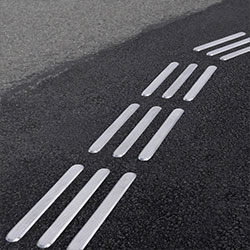
- Parallel bars - Elongated flat-topped bars running in the direction of travel
- Color contrast - Visually contrasts with surrounding surfaces
- Placement along paths - Installed along designated pedestrian walkways
The linear bars give pedestrians tactile information about the safe direction of movement and path location. Guidance or tactile wayfinding enables intuitive wayfinding, especially in large open spaces.
Key Applications of Guidance Tactile
Some key locations where guidance tactile direct and orient pedestrians include:
Transit Stations
Guidance tactile directs passengers to platforms, ticket counters, exits, etc.
Public Places
Guidance patterns guide users safely across open plazas and fields.
Office Lobbies
Guidance tactile leads from entrances to reception desks, elevators, and other areas.
Government Buildings
Guidance patterns direct users through sprawling complexes.
Comparison of Warning and Guidance Tactile
Now that we’ve covered both systems independently, let’s examine how warning and guidance tactile differ:
Purpose
- Warning tactile caution users about upcoming hazards and dangerous areas.
- Guidance tactile guides users along designated safe pedestrian circulation paths and spaces.
Typical Configuration
- Warning tactile commonly employs raised truncated domes in a square pattern.
- Guidance tactile typically has elongated raised bars running parallel in the direction of travel.
Placement
- Warning tactile is located at platform edges, curb ramps, stairs, pedestrian crossings, etc.
- Guidance tactile is installed along pedestrian walkways and circulation routes.
Tactile Experience
- Warning tactile signal caution and the need to assess the surroundings before proceeding.
- Guidance tactile provides directional orientation cues for intuitive wayfinding.
Color Contrast
- Warning tactile use bright safety yellow or white for high visibility.
- Guidance tactile uses colors contrasting with the surroundings but avoids yellow to distinguish from warnings.
Design Guidelines for Tactile Indicators in Canada
When employing TWSIs in public realm design, it’s crucial to follow Canadian accessibility guidelines and regulations. Relevant codes and standards include:
- Accessibility for Ontarians with Disabilities Act (AODA)
- CSA B651 - Tactile Walking Surface Indicators
- Ontario Building Code
- National Building Code of Canada
Key tactile design specifications involve:
- Material and structural durability
- Standardized dimensions and patterns
- Beveled edges
- High tonal and color contrast
- Strategic placement to convey the intended tactile message
Compliant tactile not only fulfill legal obligations but also create consistently accessible and interpretable cues that enhance public safety.
FAQs
What are the main types of tactile surface indicators?
The two main types are warning/attention tactile, that caution about hazards, and guidance/wayfinding tactile, which directs along safe paths.
Where are warning and guidance tactile typically used?
Warning tactile is used at platform edges, curb ramps, apartment/condo buildings, stairs, pedestrian crossings, etc. Guidance tactile is installed along walkways and circulation routes.
Can both types be used together?
Yes, warning and guidance tactile work in tandem. Guidance paths often begin/end with warning tiles indicating upcoming hazards or decision points.
What standards apply to tactile in Canada?
Relevant regulations include the AODA, CSA B651, Ontario Building Code, and National Building Code of Canada.
Let’s Create a More Accessible Environment with Tactile Solution Canada
As Canada’s premier accessibility solutions provider, Tactile Solution Canada offers a wide selection of compliant warning and guidance tactile systems from trusted brands like:
- Armor Tile® Tactile Systems
- Access Tile® Tactile Systems
- Advantage® Tactile Systems
- Eon® Tile Rubber Tactile
- Elan® Tile Porcelain Tactile
Our tactile products are:
- Engineered for strength, slip resistance, and heavy foot traffic
- Customizable with various colors, sizes, and layout options
- Compliant with all Canadian accessibility codes and standards
- Backed by 5+ year manufacturer warranties
Let our team of experts recommend the optimal tactile systems for your next public project. Contact Tactile Solution Canada today!
Transform Spaces with Tactile Warning Surface Indicators
5th Jul 2024
Ensuring accessibility for all individuals, regardless of physical ability, is a crucial moral and legal responsibility. For visually impaired persons, in particular, navigating the built environment poses daily challenges that most sighted individuals take for granted.
Tactile warning surface indicators (TWSIs), also known as detectable warning surfaces, provide a vital communication channel between public infrastructure and individuals with visual disabilities. Composed of standardized textured ground surfaces, TWSIs convey essential information non-visually through the sense of touch.
As per Canadian accessibility legislation like the Accessibility for Ontarians with Disabilities Act (AODA), integrating TWSIs in various indoor and outdoor public spaces is mandatory. When thoughtfully implemented, these ingenious surfaces enhance accessibility and quality of life for millions of Canadians.
Understanding TWSIs
TWSIs feature distinctive surface patterns that are easily detectable underfoot or by a cane. Two main types exist:
Attention TWSIs:
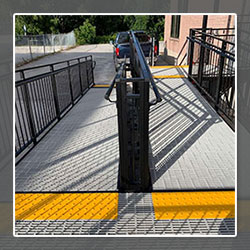
These indicate potential hazards like the edge of a platform or oncoming vehicular traffic. The typical configuration is truncated domes organized in a square or radial pattern.
Wayfinding TWSIs:
These provide directional cues to guide pedestrians along designated walking paths. Common configurations are raised bars, cones, or grooves running parallel to the direction of travel.
Applications of TWSIs Indoors
The thoughtful integration of TWSIs enhances indoor accessibility and safety for the visually impaired. Key applications include:
- Transit Platform Edges: Prevent accidental slips and falls.
- Escalator Approaches: Alert of upcoming moving staircase.
- Building Entrances: Mark doorway thresholds.
- Ramps and Stairwells: Warn of elevation change.
- Information Kiosks: Guide to customer service points.
- Corridors: Define walkways through expansive spaces.
- Lobbies: Direct to reception, elevators, and exits.
- Aisles: Help navigate large open retail floors.
Proper interior placement is crucial - too few can leave dangerous gaps in information, while overuse can cause clutter and confusion. When thoughtfully distributed, indoor TWSIs foster confidence, independence, and security.
Applications of TWSIs Outdoors
Outdoor public realms present even greater navigational challenges. Proper TWSI integration enhances outdoor accessibility by:
- Signaling Crosswalks: Define pedestrian right-of-way at intersections.
- Curb Ramps: Mark transition from sidewalk to street.Stairs and Ramps: Warn of elevation changes.
- Parking Areas: Guide to meter payment points.
With outdoor TWSIs, regular maintenance is key, as exposure can degrade materials over time. Fortunately, their durable materials offer excellent longevity even in harsh conditions.
Indoor Tactile Products
- Eon Tile - Made of durable, flexible rubber material. Provides attention and directional indicators. Suitable for high-traffic environments like shopping centers and hospitals.
- Elan Tile - Porcelain-based tactile tiles for attention and wayfinding. Exceeds durability standards. Aesthetically pleasing.
- Armor Tile System - Polymer composite tiles compliant with accessibility codes. Available as cast-in-place or surface-applied. Highly customizable.
- Access Tile - Engineered polymer tiles that are lightweight and easy to install. Replaceable and surface-applied options. Industry-leading durability.
- Advantage Tactile Systems - Elegant stainless steel tactile plates for indoor applications. Stamped with anti-slip texture.
- Fire-Resistant Tile - Special composite tactile tile resistant to flames and smoke. Meets Ontario Fire Code for high-rise buildings.
Outdoor Tactile Products
- Armor Tile System - Fully compliant detectable warning tiles. Withstand weather conditions and heavy loads. Available in many sizes.
- Access Tile - Replaceable and surface-applied tiles of durable polymers. Resilient against weather and wear.
- Advantage Tactile Systems - Heavy-duty metal tactile tiles for high-traffic outdoor use. Engineered for long-lasting performance.
- Eon Tile - Flexible rubber tactile pavers suitable for retrofits. Available with truncated domes or directional bars.
- Elan Tile - Porcelain-based tactile tiles made of premium materials. Use indoors and outdoors.
- Cast Iron Tactile Tiles - Robust Cast-iron tiles embeddable in concrete. Withstand abuse from vehicles and weather.
- Stainless Steel Domes & Bars - Individual outdoor domes and bars screwed into surfaces. Permanent anti-slip texture.
Benefits of TWSIs for Users
The benefits of thoughtfully installed TWSIs for visually impaired Canadians are immense, including:
- Improved Spatial Awareness: TWSIs provide a mental map of the surrounding environment.
- Enhanced Mobility: Independence and confidence to navigate unfamiliar spaces.
- Reduced Hazards: Warning of potential dangers like busy roads.
- Active Lifestyle: Encourages engagement with community and public spaces.
- Equity: Equal right to utilize public resources safely.
Ultimately, TWSIs allow full participation in society and provide a lifeline to accessibility.
Benefits of Installing TWSI in Public and Private Spaces
Beyond the user perspective, TWSIs also benefit the owners and operators of public and private spaces in key ways:
- Legal Compliance: Adherence to accessibility legislation like the AODA.
- Injury Reduction: Limit liability from potential accidents or falls.
- Universal Design: Create inclusive spaces usable by all.
- Corporate Social Responsibility: Demonstrate a commitment to accessibility.
- Competitive Edge: Meet consumer demand for accessibility.
By investing in proper TWSI integration, organizations show they genuinely care about inclusivity - an ethos that appeals to conscientious consumers.
Best Practices for TWSI Implementation
To maximize the benefits of TWSIs for all, consider the best practices:
- Consult Local Guidelines: Adhere to municipal standards for appropriate TWSI placement.
- User Testing: Incorporate feedback from visually impaired users post-installation.
- Consistency: Maintain uniform tactile patterns across locations.
- Maintenance: Regularly inspect and repair deteriorating surfaces.
With thoughtful design, diligent installation, and proper maintenance, the impacts of TWSIs on accessibility and inclusivity will continue growing for decades to come.
FAQs
What is the purpose of tactile ground surface indicators?
Tactile ground surface indicators provide detectable tactile cues to assist visually impaired pedestrians in navigating public spaces safely and independently. Key purposes include signaling hazards and providing directional guidance.
What are tactile ground surface indicators TGSI or tactile wayfinding and warning tiles used for?
These textured ground surface indicators serve two main functions - warning pedestrians about upcoming hazards like curbs or stairs and guiding pedestrians along designated walking paths in large open spaces.
What are warning tactile ground surface indicators?
Warning tactile ground surface indicators use distinctive surface patterns like truncated domes to signal upcoming hazards to pedestrians with visual disabilities. This alerts them to dangers like curbs, platform edges, vehicle areas, or stairs.
Conclusion
In our complex urban landscapes, seamless public accessibility requires careful infrastructural planning. For pedestrians with visual impairments, the integration of Tactile Warning Surface Indicators (TWSIssss) provides an indispensable communication channel to the built environment. Indoors and out, proper TWSIs placement promotes confidence, independence, and security during daily life.
By investing in compliant, durable, thoughtfully distributed TWSIs, businesses and urban planners take an essential step towards a Canada without barriers. At Tactile Solution, we provide reliable, superior-quality TWSIs not only meet but surpass all pertinent regulations and specifications. We offer a variety of colors, shapes, and sizes to meet the specific needs of each project.
