Blog

How Tactile Indicators Can Boost Property Value for Commercial Buildings
5th Oct 2026
Accessibility isn’t just about compliance - it’s the silent negotiator that seals deals, retains tenants, and future-proofs investments. - Tactile Solution Canada
Just picture a downtown Toronto office tower built in the 1990s that sits half-empty. Its marble lobby gleams, but tenants complain about dimly lit stairwells and confusing corridors. A young property manager, Alia, inherits the building and notices a pattern - prospective tenants tour the space but never sign. Then, during an open house, a venture capitalist using a white cane struggles to locate the elevator, his cane slipping on the unmarked transition between carpet and tile. The deal evaporates.
Six months later, that same building had a 95% occupancy rate. Rents have increased by 15%, and a disability-focused nonprofit proudly displays its logo in the lobby. The difference? Tactile indicators - those unassuming textured tiles and glowing stair nosing - transformed the space into a beacon of inclusivity and safety.
This isn’t just a hypothetical scenario. It’s the reality for Canadian commercial properties embracing tactile solutions. Let’s explore how these unassuming upgrades are rewriting the rules of real estate value.
The Hidden ROI of Tactile Accessibility
Why Commercial Properties Are Racing to Comply?
Canada’s accessibility laws are tightening:
- AODA (Ontario): Full compliance is required by 2025.
- BC Building Code 2024: Mandates tactile wayfinding in all new constructions.
- CSA B651: National standards for tactile walking surface indicators (TWSIs).
Non-compliance isn’t just risky - it’s expensive. Fines reach $2,50,000 per violation(Canada.ca). But the real cost? Lost tenants. In fact, many businesses prioritize leasing accessible spaces.
5 Ways Tactile Indicators Boost Property Value
1. Avoid Costly Penalties & Legal Risks
- AODA Non-Compliance Fines: Up to $100,000 for corporations
- Liability Reduction: Slip-and-fall lawsuits drop by a huge number post-tactile installation.
2. Attract Premium Tenants
- Revenue Boost: Inclusive workplaces outperform peers (Forbes)
- Case Study: A downtown Toronto property manager reported higher leasing rates after installing the latest tactile systems.
3. Future-Proofing for 2040 Accessibility Goals
Canada aims for full accessibility by 2040. Early adopters avoid costly retrofits:
- Modular Systems: AccessTile’s replaceable cast-in-place tiles allow easy updates.
- Durable Materials: Advantage Cast Iron lasts 15-20+ years, surviving harsh Canadian winters.
4. Enhancing Marketability Through Design
Gone are the eyesore yellow strips. Modern tactiles blend seamlessly:
- ElanTile Porcelain: Mimics high-end stone, ideal for luxury lobbies.
- Advantage Stainless Steel Domes: Sleek enough for Bay Street boardrooms.
Designer Tip: Use directional bars to guide foot traffic subtly - no more “caution tape” aesthetics.
A sleek office lobby with ElanTile directional bars integrated into marble flooring, guiding visitors to elevators.
5. Operational Efficiency Gains
Tactile systems reduce staff burdens:
- Wayfinding Bars: Tenants navigate independently, freeing concierge time.
- Photoluminescent Exits: Eliminate battery checks for exit signs (Ecoglo’s 70-hour+ glow).
Busting 4 Myths Holding Property Owners Back
Myth 1: “Tactiles Look Industrial and Cheap”
Reality:
- ElanTile’s Porcelain Series: Used in Toronto’s CIBC Square, it’s mistaken for custom tile work.
- Custom Colors: AccessTile offers enough shades to match branding.
Myth 2: “Retrofitting Will Disrupt Tenants”
Reality:
- Surface-Applied Solutions: AccessTile adhesives install overnight.
- Phased Rollouts: The Toronto condo project upgraded floors during weekends with zero tenant complaints.
Myth 3: “It’s Only for Blind Tenants”
Reality: Tactiles benefit everyone:
- Delivery Teams: Follow directional bars to loading docks.
- Visitors: Navigate complex layouts during fire drills.
- Aging Tenants: Detectable warnings prevent stair missteps.
Myth 4: “Too Costly for ROI”
Breakdown:
- Cost: ~$20–$30/sq.ft for premium tactiles.
- ROI: Offices can see higher ROI via tenant retention and rent hikes over a few years.
How to Implement Tactile Upgrades Without the Headaches
Step 1: Audit & Prioritize
Use the following Framework:
- Scrutinize high-risk zones (entries, stairs, parking).
- Engage tenants in surveys to identify pain points.
Step 2: Match Solutions to Needs
- Luxury Lobbies: ElanTile Porcelain with integrated wayfinding.
- Parking Garages: Advantage Tile Cast Iron, Advantage One stainless steel single dome or bars for heavy traffic.
- Emergency Paths: AccessTile, ArmorTile, and Ecoglo photoluminescent strips.
Step 3: Future-Proof with Modularity
Choose replaceable tiles (AccessTile) and upgradable photoluminescent strips (Ecoglo).
Final Thoughts: Where Compassion Meets Capital Growth
Imagine two buildings side by side in Montreal’s Golden Square Mile. One cling to bare-minimum accessibility. The other - outfitted with glowing Ecoglo paths, seamless AccessTile warning domes, and ElanTile guidance tiles - sports a leasing waitlist, reduced insurance premiums, and a LinkedIn shoutout from a disability advocacy group.
This isn’t just compliance. Its competitive advantage made tactile.
As Canada accelerates toward 2040’s accessibility targets, early adopters are already reaping the rewards:
- Higher tenant retention
- Lower operational risks
- Enhanced community reputation
Ready to Unlock Your Property’s Hidden Value?
Tactile Solution Canada’s team has helped many properties transform accessibility into profitability.
- Book Your Free Compliance Audit: 1-888-600-6184
- Ask About Bulk Order Discounts: info@tactilesolution.ca
We don’t install tiles - we build pathways to inclusion. - Tactile Solution Canada

Keeping Shared Kitchens and Showers Accessible After Handover
5th Oct 2026
A staff kitchen can become difficult to use without a single alteration to its floor plan. A recycling bin moves beneath the sink. A drying rack occupies the clear counter space. A mixer handle becomes stiff, but the maintenance team closes the inspection because water still flows.
Shared showers develop similar problems. Cleaning staff return a handheld shower to the highest position on its rail. A replacement hose catches on nearby fittings. A control marking wears away, leaving users to discover its function by trial and error.
For facility managers responsible for workplaces, recreation centres and other shared buildings, accessibility needs attention throughout operation. The useful question is whether people can still complete everyday tasks independently after cleaning, repairs and equipment changes.
Document the usable arrangement at handover
Handover information should explain how an amenity is intended to work. Alongside drawings, product references and maintenance manuals, record the approved arrangement of controls, dispensers, storage and movable furniture. Photographs can help cleaning and maintenance teams restore that arrangement consistently.
At a shared kitchen sink, identify the approach space, any required knee clearance and the counter area intended for setting down a cup or container. For a shower, record the relationship between the seat, controls, handheld spray and grab bars. A photograph of the fittings alone will miss those relationships.
This operational record supports ongoing checks; it does not establish that the original design was compliant. Applicable provincial or territorial requirements, approved project documents and the relevant technical specifications remain the basis for assessing the installation.
Inspect the route all the way to the activity
An accessible doorway is only part of the journey. Follow the route through the room to the position where someone fills a kettle, operates a mixer or transfers to a shower seat. Look for obstructions introduced during ordinary use, including supply boxes, laundry baskets, mobile shelving and cleaning carts.
Pay particular attention to items that staff consider temporary. A trolley parked for half an hour can make an amenity unavailable during the only break a person has. Provide a practical storage location so keeping the route clear does not depend on repeatedly moving the same obstruction elsewhere.
Where tactile indicators and wayfinding features are already installed, keep them visible, unobstructed and in good condition. Inside the amenity, check for loose mats, damaged flooring and persistent water accumulation. Recurring wet patches need investigation into leakage, drainage, cleaning practices or splashing rather than repeated placement of a warning sign.
Check the whole task at the kitchen sink
A plumbing inspection may confirm that a tap opens, closes and does not leak. An accessibility review also considers whether a person can approach it, identify the control, operate it and use the water without an awkward stretch.
Consider a simple task such as filling a mug. Is there somewhere reachable to put it down? Does the spout deliver water into a useful part of the bowl? Can the handle travel through its full operating movement without striking the backsplash or an adjacent dispenser?
When comparing replacement kitchen taps, assess the control position and movement alongside the mounting dimensions. A fitting that occupies the same hole can place its handle farther away or require a different grip. Obtain the relevant technical information and evaluate it against the intended users and the project requirements before ordering.
Pull-out sprays deserve a separate check. Observe whether the head releases and docks smoothly, whether the hose moves freely, and whether users must keep pulling against resistance to complete a task. Inspect the space below the sink as well: stored supplies can obstruct the hose mechanism or occupy clearance intended for a seated user.
Include people with disabilities in reviewing the arrangement. A standing staff member reaching across the counter cannot establish how the sink works for someone approaching in a wheelchair or using one hand.
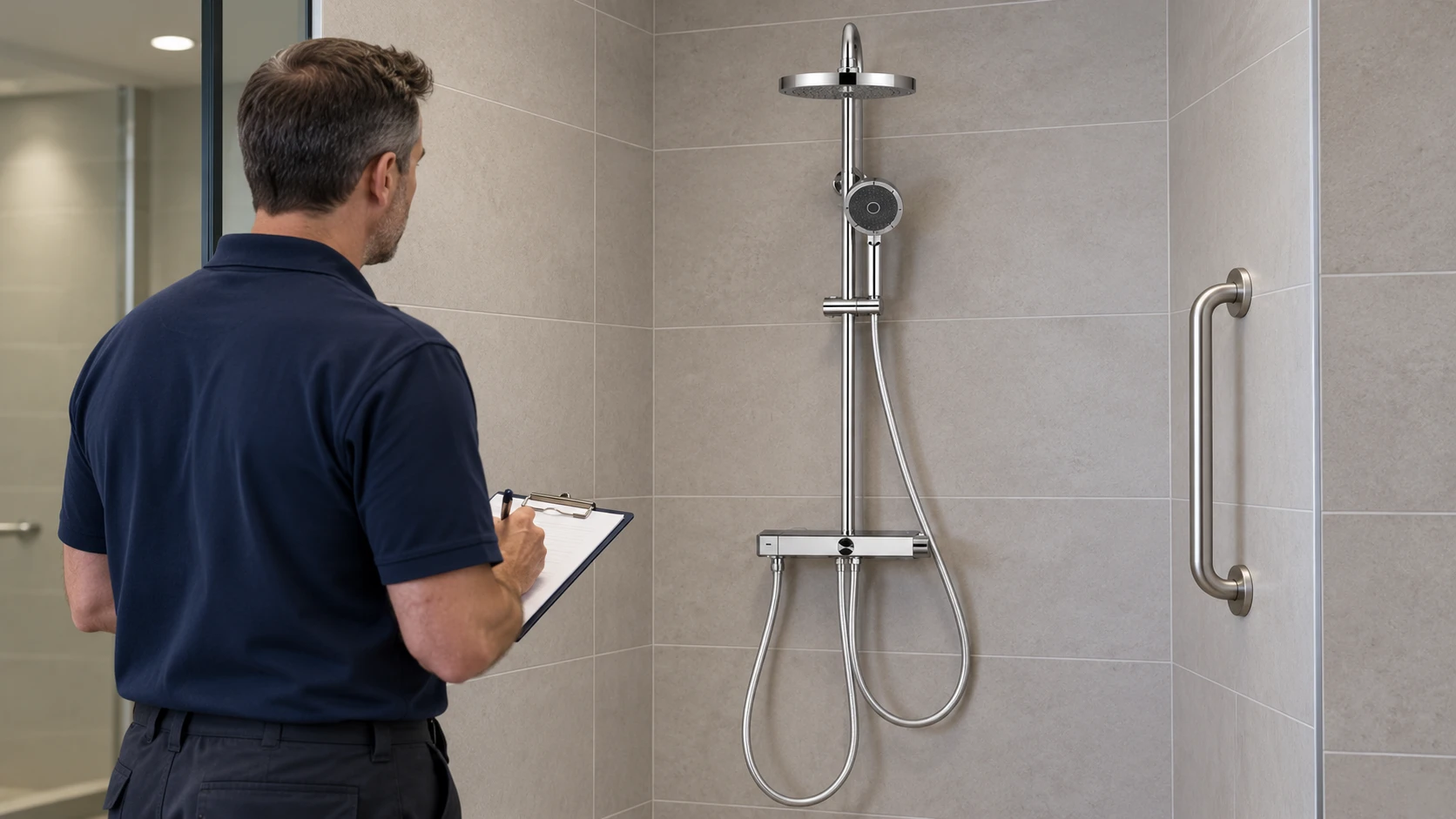
Review shower controls from their intended use position
In a shared shower, the position from which staff test the equipment may differ from the position from which a visitor needs to operate it. Check the relationship between the controls and the intended seated or standing position, including access before the water starts running.
Inspect the handheld shower as an assembly: spray head, holder, adjustment mechanism and hose. A holder can slide correctly yet demand an awkward pinch to release it. A hose can remain watertight while becoming stiff enough to make handling difficult. Returning the spray head to a reachable position should be part of the room-reset procedure.
When sourcing replacement shower taps, review how users select the outlet, adjust the temperature and stop the water. Product photographs cannot establish operating effort, temperature protection or suitability for a particular accessible installation. Those decisions require the model documentation and an assessment of the complete arrangement.
Keep shower rails and grab bars distinct in inspection records. A rail supplied to support an adjustable shower head should not be treated as a body-support fitting unless it is specifically designed and installed for that purpose. Have qualified personnel investigate temperature instability and check protective controls according to the equipment instructions and applicable requirements.
Treat replacement parts as changes to usability
A small repair can change the interaction with a fixture. A new cartridge may alter operating resistance. A different handle may change reach or grip. A replacement dispenser may project farther into an approach space.
Before approving a substitution, compare the proposed part with the original functional requirements. After installation, repeat the relevant task checks. Closing the work order because the component fits and does not leak leaves the effect on accessibility unexamined.
|
Observed change |
Possible effect on use |
Follow-up action |
|---|---|---|
|
A mixer handle becomes harder to move |
Users with limited grip or strength may struggle to control the water |
Arrange servicing and reassess operation after the repair |
|
A bin is placed beneath an accessible sink |
The intended seated approach is obstructed |
Relocate the bin and establish a suitable permanent position |
|
A handheld shower is returned above the agreed position |
A seated user may be unable to retrieve it |
Restore the position and update cleaning instructions |
|
A replacement control has different movement or markings |
Previously familiar operation may become difficult or unclear |
Check the replacement against the specification and review it with users |
Give each reported barrier an owner
Useful inspection records describe the task affected. “Shower checked” provides little information. “Handheld spray cannot be retrieved from the seat” identifies a problem that someone can investigate and verify after repair.
Record the location, the observed barrier, the person responsible for action and the target completion date. If an amenity must be taken out of service, communicate the interruption and any suitable alternative through the facility’s established channels.
Set inspection intervals according to usage, previous faults, equipment instructions and the facility’s maintenance plan. Add checks after repairs, layout changes and user reports. A lightly used staff shower and a heavily used recreation-centre changing area need different levels of attention.
Finally, close the loop with the people who use the space. Confirm that a repair has restored the task they reported, and carry any revised positioning instructions into cleaning and maintenance routines. This makes accessibility part of the building’s everyday operation, with clear responsibilities long after the installation team has left.

ElanTile Porcelain vs Metal Tactile Domes: Which Looks Better Indoors?
1st Oct 2026
When you spend a massive budget on a custom terrazzo floor or imported Italian marble, the absolute last thing you want to do is cover it up with industrial safety plastic.
As an architect or interior designer in Canada, you face this exact reality at the end of every major commercial project. You must meet mandatory accessibility codes at the top of every grand staircase and before every elevator bank. You need Tactile Walking Surface Indicators (TWSI) to pass your final building inspection.
You must integrate these physical warnings without destroying the clean, modern aesthetic you worked so hard to create.
At Tactile Solution Canada, we consult directly with top-tier design firms who refuse to compromise o
n aesthetics. We supply premium safety infrastructure that actually enhances architectural beauty. When it comes to upscale indoor environments, the debate always comes down to two premium materials: full-body porcelain and marine-grade stainless steel.
Today, we are stripping away the sales jargon. We will compare ElanTile Porcelain directly against Advantage ONE Stainless Steel domes. We will examine how they manipulate light, how they sound under a white cane, and how they handle the reality of daily commercial floor cleaning.
How Do Porcelain and Stainless Steel Tactile Domes Impact the Aesthetic Philosophy of High-End Interiors?
Your choice between porcelain and metal ultimately depends on how you want the safety feature to interact with the surrounding space. You need to decide if you want the warning surface to feel like a seamless extension of the floor, or if you want it to act as a sleek, modern architectural accent.
Both materials provide permanent slip resistance and full code compliance. The difference lies entirely in the visual execution.
Why Should You Choose ElanTile Porcelain Tactile Indicators for a Seamless Monolithic Floor Design?
If your goal is a smooth, uninterrupted floor plane, porcelain is your exact answer. ElanTile is manufactured from double-loaded, full-body porcelain stoneware that far exceeds standard commercial tile strength.
- The Seamless Integration: Because it uses a traditional square tile format, your flooring contractor can integrate it perfectly into the existing grout lines of a tile floor. It feels like it was always meant to be there.
- Glare Reduction: High-end lobbies often use intense overhead spotlighting. Polished floors bounce this light around and create harsh visual glares. ElanTile features a matte, slip-resistant finish. It absorbs light rather than reflecting it, providing a calm, grounded visual anchor in brightly lit spaces.
- Precise Colour Matching: You can choose premium colors like Charcoal, Ivory, or Almond. This allows you to intentionally contrast with your primary floor color. You satisfy strict code requirements while maintaining a highly sophisticated, earthy palette.
When Are Advantage ONE Stainless Steel Domes the Best Choice for a Minimalist Architectural Accent?
Sometimes you do not want to use a solid tile format at all. If you are laying down an incredibly expensive natural stone slab, you want your guests to see the actual stone.
- The Power of Negative Space: Advantage Tactile Systems offers individual metal attention domes and wayfinding bars. Your contractor drills these directly into the substrate. Because there is no base tile, the expensive flooring underneath remains completely visible between the steel domes.
- Modern Industrial Appeal: These indicators are machined from solid 316L Marine Grade Stainless Steel. They bounce ambient light beautifully. They add a sharp, highly contemporary touch that looks incredible in modern corporate towers, high-end retail boutiques, and upscale museums.
How Can You Meet AODA and CSA B651 Accessibility Codes Without Ruining Your Architectural Vision?
The law is the law. To pass your building audit, your tactile installations must satisfy the Canadian Standards Association (CSA) B651 guidelines and provincial mandates like the AODA in Ontario.
The biggest hurdle for designers is the luminance contrast rule. Your tactile indicators must contrast sharply with the surrounding floor. This ensures individuals with partial vision can spot the hazard easily before their foot touches the edge of the stairs.
Achieving this required contrast is very different depending on the material you choose.
- How to Achieve Luminance Contrast with Porcelain: Hitting your contrast numbers with porcelain is straightforward. If you have a light grey concrete floor, you install dark Charcoal ElanTile. If you have a dark floor, you use bright Ivory tiles. The color runs through the entire thickness of the full-body porcelain. Heavy foot traffic will never wear the contrast away over time.
- How to Achieve Luminance Contrast with Stainless Steel: Bare stainless steel contrasts beautifully against dark floors. But if you have a white marble floor, bare steel fails the luminance contrast test instantly.
Advantage ONE solves this problem cleverly. You can specify stainless steel domes that feature a black or safety-yellow carborundum grit insert in the center. This gives you the sleek metallic edge you want, the extreme slip resistance you need, and the bold visual contrast required to pass your inspection legally.
If you are ever unsure which product combination passes the code for your specific flooring material, our digital Tactile Solution Finder tool calculates the exact product match for you in seconds.
What Is the Difference in Underfoot Experience and Acoustic Resonance Between Porcelain and Metal Tactiles?
Accessibility is a multisensory experience. A person with vision loss relies on both the physical feel under their shoes and the sound of their white cane striking the floor.
Providing the correct acoustic feedback is just as important as providing a physical bump.
- Acoustic Profile of Porcelain: When a white cane sweeps across ElanTile porcelain, it produces a dull, solid, stone-like thud. It sounds exactly like striking a regular ceramic tile. Many designers strongly prefer this muted acoustic profile for quiet environments like university libraries, art galleries, or luxury spa lobbies.
- Acoustic Profile of Stainless Steel: Stainless steel produces a sharp, highly distinct metallic tap when struck by a cane. Visually impaired users often highly praise this sharp acoustic feedback. It cuts through the ambient background noise of a busy shopping mall or a noisy airport terminal instantly. It is impossible to ignore, which increases safety in chaotic environments.
What Are the Long-Term Maintenance Realities for Facility Teams Managing Porcelain vs Metal Tactiles?
Architects design the building, but facility managers have to clean it for the next twenty years. A beautiful tactile installation is useless if a standard floor buffer destroys it in six months.
You must consider how your chosen material will react to heavy commercial cleaning equipment.
How to Maintain and Clean ElanTile Porcelain?
Porcelain is virtually bulletproof against stains. It features a near-zero water absorption rate. If a guest drops a cup of dark roast coffee on the tactile tile, the liquid wipes right off without leaving a permanent shadow.
Janitorial teams can run standard heavy floor scrubbers right over the domes without worrying about damage. It requires absolutely no specialized maintenance training.
How to Maintain and Clean Advantage ONE Stainless Steel?
Premium 316L stainless steel will never rust. However, your cleaning crew must be properly trained to handle the metal.
They cannot use highly corrosive alkaline degreasers on the domes. They must never use abrasive wire brushes or steel wool to clean the floor directly around the steel markers. Abrasive tools will permanently scratch the premium machined finish of the metal and dull the shine.
How Should You Choose Between Porcelain and Stainless-Steel Tactile Indicators for Your Next Project?
Both materials offer permanent safety solutions and full code compliance. Your final decision should rely entirely on your architectural environment, your flooring type, and your installation timeline.
When You Should Specify ElanTile Porcelain:
- You are installing a brand new tile floor and want the safety markers to align perfectly with your grout grid.
- You want a matte, glare-free finish that mimics natural stone perfectly.
- You are designing a quiet space and prefer a muted acoustic profile for white cane users.
When You Should Specify Advantage ONE Stainless Steel:
- You are drilling into existing, expensive terrazzo or hardwood and want to leave the premium floor highly visible.
- You are designing a sleek, modern, or industrial-chic commercial space.
- You want to provide sharp, highly distinct acoustic feedback for visually impaired visitors in a loud environment.
Transform Your Interior Design with Total Confidence
You do not have to choose between a beautiful building and a safe building. By selecting premium materials like full-body porcelain or marine-grade stainless steel, you provide essential accessibility cues that look and feel like intentional, high-end architectural design.
At Tactile Solution Canada, we supply the physical safety infrastructure that protects Canadians from coast to coast. We carry the industry’s most trusted brands, ready to ship directly to your job site.
If you are specifying materials for an upcoming set of blueprints or managing an active interior renovation, we are here to help. Explore our comprehensive tactile solutions today, and let us ensure your next luxury project passes inspection flawlessly.
Frequently Asked Questions on Choosing Between Porcelain and Metal Tactile Indicators for Indoor Spaces
Are Stainless Steel Tactile Domes Slippery When Wet?
Not at all. High-quality stainless steel domes feature micro-grooved concentric rings or integrated carborundum grit inserts on the top surface. These engineering details provide exceptional wet and dry traction. They easily pass all Canadian slip-resistance testing mandates.
Does Porcelain Tactile Tile Crack Under Heavy Commercial Traffic?
No. Standard ceramic wall tile cracks easily, but ElanTile is a commercial-grade, full-body porcelain stoneware. When properly set into a solid mortar bed, it boasts immense compressive strength. It can easily handle heavy luggage carts, strollers, and pallet jacks without cracking.
Can I Install Individual Steel Domes on an Existing Concrete Floor?
Yes. Advantage ONE domes are specifically designed for surface retrofitting. A contractor uses a precision template to drill holes in the floor. They inject a high-strength structural epoxy and tap the metal stems directly into the cured concrete for a permanent hold.
What is the Exact CSA B651 Luminance Contrast Requirement for Indoor Floors?
The CSA B651 standard requires a strong visual contrast between the tactile indicator and the adjacent floor surface. It generally requires a minimum 70 percent contrast in light reflectance value. This ensures the hazard warning is highly visible to pedestrians with partial sight.
How Do I Know Which Tactile Products are Fully Canadian Code-Compliant?
You must verify that the product meets the specific dome height, diameter, and spacing geometry dictated by national standards. At Tactile Solution Canada, every product in our comprehensive tactile categories is fully engineered to meet or exceed AODA, NBC, and CSA B651 guidelines.

How Canadian Wineries, Breweries & Distilleries Can Make Their Tasting Rooms Accessible with Tactile Products
25th Sep 2026
A truly great tasting room invites every single guest to experience the craft comfortably, safely, and independently.
The Canadian craft beverage industry is booming. From the rolling vineyards of the Okanagan Valley to the bustling craft breweries in Halifax, tasting rooms have become premier tourist destinations. These spaces are no longer just simple retail shops. They are fully immersive experiences featuring guided production tours, dimly lit barrel cellars, and sprawling outdoor patios.
However, blending industrial production facilities with high-end hospitality creates a massive architectural challenge. You have wet concrete floors, sudden drop-offs into vineyards, and steep stairs leading up to mezzanine seating. For a guest with vision loss, these unique architectural features can turn a relaxing weekend tour into a highly dangerous obstacle course.
At Tactile Solution Canada, we work closely with the hospitality sector to solve these exact problems. Today, we will show you how to protect your guests and pass your building inspections. You will learn how to integrate Tactile Walking Surface Indicators (TWSI) seamlessly into your rustic or industrial design.
Understanding the Rules: AODA and CSA B651 for Tasting Rooms
You cannot run a public hospitality business based on guesswork. Wineries and breweries are public commercial spaces. They must follow the exact same strict building codes as a shopping mall or a hospital.
If your facility is in Ontario, you must comply with the Accessibility for Ontarians with Disabilities Act (AODA). This law dictates that all newly constructed or redeveloped public areas must be completely barrier-free. Other provinces have similar strict mandates under their local building codes.
You must also adhere to the Canadian Standards Association (CSA) B651 guidelines. This standard gives you the exact math for your facility. It tells your contractor exactly how far apart the tactile domes must sit. It also demands a high luminance contrast, meaning your safety tiles must stand out clearly against your existing floor color.
Where Do You Need Tactile Indicators in a Brewery or Winery?
A modern craft beverage facility contains several completely different environments under one roof. You must evaluate each distinct zone to ensure your guests are protected from the moment they arrive.
1. The Main Entrance and Retail Shop
Your front door is the first impression. Many tasting rooms feature curbless entrances to accommodate wheelchairs and strollers. You must install attention domes at this exact transition point. These raised circular bumps act as a physical stop sign, letting a visually impaired guest know they are crossing from the parking lot into the pedestrian zone.
2. Mezzanine Tasting Areas and Balconies
Brewery designers love to put tasting lounges on a second-floor mezzanine overlooking the production tanks. This requires a large public staircase. You must place a tactile warning surface at the very top landing of these stairs. This provides a crucial physical warning before a guest accidentally steps into a sudden drop.
3. Indoor to Outdoor Patio Transitions
Winery guests love to take their glasses outside to enjoy the vineyard views. The transition from the smooth indoor tasting room to the rough outdoor patio often involves a small step or a raised door threshold. You must mark this transition clearly to prevent dangerous trips and falls during busy weekend service.
4. Crush Pads and Production Tour Routes
If you offer behind-the-scenes tours of your production facility, you are inviting the public into an active industrial zone. Floors are often wet from tank washdowns. You must use tactile wayfinding bars to create a safe, designated walking route that keeps guests away from dangerous machinery and slippery drains.
Choosing Tactile Materials that Match Your Vibe
Many hospitality owners hate the idea of accessibility upgrades because they picture cheap, industrial plastics ruining their aesthetic. This is a massive misconception. You can easily select premium materials that blend perfectly into your brand's unique atmosphere.
1. Advantage ONE Stainless Steel for the Industrial Brewery
If your craft brewery features polished concrete floors, exposed steel beams, and a modern industrial vibe, you should use Advantage ONE Stainless Steel indicators.
Instead of a solid square tile, your contractor drills these individual metal domes directly into your concrete floor. They look like deliberate architectural accents rather than mandatory safety features. They are incredibly durable, highly slip-resistant, and will never rust or corrode from spilled beer.
2. ElanTile Porcelain for the Luxury Winery
Many high-end wineries feature stunning natural stone or custom tile floors. For these environments, we highly recommend ElanTile Porcelain tactile indicators.
These certified porcelain stoneware tiles mimic the look of natural granite and marble. They are baked at extreme temperatures to achieve near-zero water absorption. This makes them highly resistant to dark red wine spills. We see these same premium tiles used frequently when boosting accessibility in wellness retreat clubs and luxury resorts.
3. Armor Tile for Wet Production Zones
For your outdoor crush pads and wet production areas, you need a heavy-duty workhorse. Armor Tile engineered polymer composites are the absolute best choice.
These tiles are incredibly tough and highly slip-resistant. They can easily survive the weight of a forklift or a heavy pallet jack moving wine barrels. They are also UV-stabilized, meaning their safety colors will not fade under the hot Canadian sun.
Securing Dimly Lit Barrel Cellars with Photoluminescent Products
Barrel cellars are arguably the most atmospheric part of any winery or distillery. They are intentionally kept cool and very dimly lit to protect the aging product. This creates a beautifully moody environment for private tastings.
However, a dark cellar is a massive liability. If a guest cannot see the edge of the stairs in the dark, they will fall.
You must secure these low-light areas with Ecoglo photoluminescent stair nosing. These specialized anti-slip strips absorb ambient room light all day long. In the dim cellar, they glow brightly to clearly mark the edge of every single step.
They require zero electrical wiring. If a severe summer storm knocks out the power to your rural winery, these glowing strips will safely guide your guests out of the dark cellar. We use this exact same technology to handle hotel lobby accessibility in Canada for major boutique chains.
How to Upgrade Your Facility Without Stopping Production
Closing your tasting room for a week of renovations is simply not an option for most small business owners. You need to complete your accessibility upgrades quickly and quietly.
You do not have to pour fresh concrete to become compliant. You can use surface-applied tactile systems to retrofit your existing floors.
The Retrofit Installation Process
Your maintenance team or a local contractor can handle this job easily. They simply clean and dry your existing floor thoroughly. They apply a premium structural adhesive to the back of the tactile tile.
They press the tile into place and secure the corners with color-matched mechanical fasteners. The entire process takes just a few hours. You can upgrade your main entrance on a Monday morning and be fully ready for your afternoon tasting tours.
If you are unsure which specific product fits your existing floor type, you can use our digital Find the Right Solution tool. You just plug in your surface material and your hazard type. The tool instantly generates a precise shopping list tailored to your exact building.
4 Rules for Maintaining Tactile Indicators in the Beverage Industry
Your job is not finished after the installation is complete. You must maintain your safety infrastructure to ensure it protects your guests for years to come.
- Avoid Harsh Solvents on Polymers: Your production cleaning team likely uses heavy industrial chemicals to sanitize tanks. Never use these harsh solvents on polymer tactile tiles. They will strip the UV coating and degrade the plastic. Use mild soap and warm water instead.
- Protect Stainless Steel from Scratches: If you have stainless steel domes in your tasting room, never clean them with abrasive steel wool or stiff wire brushes. Use a soft nylon brush to preserve their premium machined finish.
- Check Fasteners Annually: High foot traffic can loosen mechanical screws over time. Have your maintenance team walk the facility every spring. Tightening a loose screw takes seconds and prevents a major tripping hazard.
- Keep Glowing Strips Clean: Photoluminescent stair nosings only work if they can absorb light. If they are covered in thick dust or sticky beer spills, they will not glow. Wipe them down weekly with a damp cloth to ensure maximum performance.
Frequently Asked Questions (People Also Ask)
Do small farm wineries really need to follow AODA standards?
Yes. If your farm winery operates a retail store or a public tasting room, it is legally classified as a public commercial space. You must provide barrier-free access and install tactile warnings at all sudden hazards like stairs or ramps.
What is the best tactile material for an outdoor winery patio?
For an outdoor patio exposed to harsh Canadian winters, you should use UV-stabilized polymer tiles like Armor Tile, or heavy-duty cast iron plates. These materials resist frost heaving and will not crack in freezing temperatures.
Why do I need a high luminance contrast for my safety tiles?
Many visually impaired guests are not completely blind; they have partial sight. A high visual contrast helps these guests see the hazard warning clearly before their white cane even touches the surface.
Can I install surface-applied tiles over old barn wood floors?
Yes. Surface-applied tiles can be adhered to sturdy, clean wood floors using the correct structural adhesives and wood-specific mechanical fasteners. Always ensure the wood is dry and free of rotting sections before installation.
Are glowing stair strips allowed by the National Building Code?
Yes. The National Building Code of Canada highly approves of photoluminescent egress path markings. They are proven to provide reliable, zero-energy guidance during emergency evacuations and total power failures.
Welcome Every Guest with Absolute Confidence
Running a successful brewery, winery, or distillery is about crafting memorable experiences. When your facility is difficult to navigate, it creates unnecessary stress for guests with disabilities.
You have the power to remove these physical barriers completely. By planning ahead and choosing the right premium materials, you can make your tasting room incredibly safe without compromising your unique brand aesthetic.
At Tactile Solution Canada, we supply the safety infrastructure that protects the Canadian hospitality industry. We offer a comprehensive range of solutions designed specifically for high-traffic public spaces.
From sleek stainless steel domes to zero-energy glowing stair strips, we have exactly what your facility needs to pass inspection. Check out our complete product catalog today. Contact our expert team and let us help you build a safer, more welcoming tasting room for every single guest.

Proper Guide to AODA Tactiles: Fire-Resistant Options
23rd Sep 2026
With fire safety being a major concern in public spaces and buildings, it is crucial for architects, contractors, business managers, and building owners to invest in solutions that enhance accessibility while meeting stringent fire code regulations. This is where Access Tile® Surface Applied Fire Resistant Tactile comes into the picture.
In this comprehensive guide, we will explore how these innovative tiles allow you to achieve both fire resistance and accessibility in one go!
Understanding Access Tile® Surface Applied Fire Resistant Tactile
Access Tile® Surface Applied Fire Resistant Tactile are detectable warning tiles specifically engineered for indoor applications in high-rise buildings over 7 floors. These tiles contain truncated domes that serve as Tactile Walking Surface Indicators (TWSI) to alert people with visual impairments about potential hazards or changes in direction.
These tiles are unique because they are made from FIRESENTRY-XTM - a proprietary composite material offering maximum flame spread resistance and minimal smoke development. This grants the tiles exceptional fire-retardant properties while retaining critical accessibility functions.
Access Tile® Fire Resistant tiles meet the rigorous flame spread and smoke development standards set by the ULC-S102.2 test method. This makes them fully compliant with the fire safety requirements of the Ontario Building Code (OBC).
Key Features:
- Made of FIRESENTRY-XTM composite for fire resistance
- Meet ULC-S102.2 standard for flame spread and smoke
- Fully compliant with OBC fire safety codes
- Provide essential TWSI function for accessibility
- Beveled edges provide a smooth transition
- Available in 3 standard colors and multiple sizes
Benefits of Access Tile® Fire Resistant Tactile
- Safety: The fire-retardant tile ensures safety of occupants in case of a fire emergency. The tiles prevent rapid spread of flames and smoke.
- Accessibility: The truncated domes allow visual accessibility to hazards for people with vision loss.
- Legal Compliance: Meeting Ontario fire codes ensures compliance with legal regulations for high-rise buildings over 7 floors.
- Versatility: Available in different sizes and colors to suit diverse interior designs and spaces.
- Low Maintenance: Durable construction allows longevity with minimal maintenance needs.
- Warranty: Backed by a 5-year manufacturer’s warranty.
How Do Access Tile® Fire Resistant Tiles Work?
These special composite tiles contain proprietary intumescent technology that makes them highly fire-resistant. When exposed to high heat and flames, the FIRESENTRY-XTM layer forms a thick foam char layer that acts as a barrier.
This thermal barrier significantly slows down the spread of fire and smoke, allowing more time for evacuation. The materials also have low smoke emissions, enhancing visibility during fires.
Additionally, the composite construction makes the tiles durable and strong enough to withstand high foot traffic. The truncated dome texture provides an essential tactile warning about potential hazards or level changes through contrasting texture.
Installing Access Tile® Fire Resistant Tiles
One of the great benefits of Access Tile® tiles is their ease of installation. They can be easily installed over any existing floor through a straightforward process:
- First, the perimeter of the installation area is marked, and the surface ground is in preparation.
- After cleaning the tile underside, an adhesive is applied to the tile back as per specifications.
- The tile is then placed and firmly pressed to ensure proper bonding.
- Holes are drilled through the tile into the substrate, and color-matched anchors set into place.
- Perimeter sealant is added to fill any gaps and complete the installation.
- Using standard cutting tools, the tiles can also be cut to size or radius. Overall, the fire-resistant Access Tile® tactile can be installed seamlessly without any demolition, dust, or noise.
Applications of Access Tile® Fire Resistant Tactile
Access Tile® FR tiles present the ideal fire-rated tactile solution for various indoor settings, including:
- Stairwells in high-rise buildings
- Exit stair lobbies and vestibules
- Elevator lobbies
- High-traffic corridors
- Transit platforms
- Atriums
- Waiting areas
Anywhere requiring accessibility features in a fire-rated space over 7 floors can benefit from these tiles. Their life-saving fire protection and accessibility make Access Tile® FR tiles a smart investment.
Standards and Codes Governing Tactile Tiles
When selecting tactile tiles, it is crucial that they meet various accessibility and fire standards. Key regulations include:
Accessibility:
- AODA Design of Public Spaces requirements
- CSA B651 for visual and tactile accessibility
- OBC requirements for handicapped access
Fire Safety:
- ULC S102.2 surface burning characteristics
- OBC fire rating requirements
- Flame spread and smoke developed limits
By meeting these codes, Access Tile® Fire Resistant tiles check all boxes for compliant tactile flooring.
FAQs on Access Tile® Fire Resistant Tactile
What are Access Tile® Fire Resistant Tiles made of?
They are made from FIRESENTRY-XTM, a proprietary composite with intumescent technology that provides flame spread resistance and low smoke development.
Where are these fire-rated tactile tiles required?
Access Tile® FR tiles are specially mandated in high-rise buildings over 7 floors to meet Ontario Fire Code requirements.
Do these tiles provide accessibility features?
Yes, the truncated dome pattern gives an essential tactile warning about potential hazards for people with vision loss.
What sizes are the Access Tile® Fire Resistant Tiles available in?
These tiles come in multiple standard and custom sizes ranging from 12”x12” up to 24”x60” to suit layout needs.
How long is the warranty period on these tiles?
Access Tile® provides a 5-year manufacturer’s warranty on the Fire Resistant tactile, ensuring peace of mind.
Why Partner with Tactile Solutions Canada?
As Canada’s premier accessibility solutions provider, Tactile Solutions Canada offers a wide range of compliant products from trusted brands like Access Tile® for your projects.
Our team of experts provides guidance on selecting optimal tactile tiles tailored to your unique specifications, ensuring seamless adherence to Canadian regulations.
Be both accessibility-ready and fire-safety-insured by contacting Tactile Solutions Canada today!

Tactile Tiles for Blind People: Codes, Requirements & Solutions in 2026–27
3rd Sep 2026
The most expensive tactile tile mistake is often made before a single tile is installed.
It happens when a contractor, building owner or project manager chooses a product first and checks the applicable accessibility requirement later.
In Canada, that order should be reversed.
Tactile tiles, more formally called Tactile Walking Surface Indicators (TWSIs), are not decorative floor accessories. They communicate information through texture, contrast and placement to people who are blind, have low vision or use a long cane. Attention indicators warn of a hazard or transition. Direction indicators help establish an understandable route through spaces where other wayfinding cues are limited.
“A successful tactile surface communicates the right message before the pedestrian reaches the hazard.” - Shubham Banyal
For projects planned in 2026 and 2027, there is another reason to pay close attention: Canada's accessibility framework continues to evolve. The National Building Code of Canada 2025 has been published, Ontario is operating under its 2024 Building Code, and Accessibility Standards Canada has important wayfinding and built-environment standards progressing toward anticipated 2027 publication.
So, what actually applies to your project today, and what should you prepare for next?
Tactile Tile Requirements in Canada
For contractors, architects, property managers and building owners, think of tactile compliance as a six-part chain:
- Identify the jurisdiction governing the project.
- Determine whether a warning or directional cue is needed.
- Confirm the required tactile geometry and dimensions.
- Establish adequate visual or luminance contrast.
- Select a product appropriate for the substrate and environment.
- Install it at the correct location, orientation and depth—and maintain it afterwards.
Getting only five of those six right can still produce a poor installation.
That is why simply purchasing a product described as an “AODA tactile tile” or “CSA tactile” is not enough. Compliance depends on the complete installed condition, not merely the material sitting in a box.
What Codes Govern Tactile Tiles for Blind People in Canada in 2026?
There is no single tactile requirement code in Canada. This is one of the most important distinctions for anyone specifying tactile tiles in Canada.
The National Building Code of Canada is a model code. The NRC specifically advises users to determine which codes and regulations apply in their province or territory because adoption occurs through provincial and territorial authorities. The current National Building Code of Canada 2025 is available, but its publication does not automatically make every provision enforceable in every municipality on the same date.
For a real project, your compliance review may therefore involve:
- the applicable provincial or territorial building code;
- municipal accessibility/design requirements;
- the National Building Code provisions adopted in that jurisdiction;
- referenced standards such as CSA/ASC B651 or ISO 23599;
- federal requirements where the facility or organization falls under federal jurisdiction.
This is why a Toronto condominium entrance, federally regulated transportation facility and municipal streetscape project should not automatically use an identical specification.
What role does CSA/ASC B651 play?
CSA/ASC B651:23, Accessible design for the built environment, is an important Canadian technical accessibility standard. It addresses accessible paths, surfaces, tactile indicators and other built-environment features.
TWSIs generally fall into two functional categories:
- Attention indicators: truncated domes used to warn of hazards or significant transitions.
- Direction indicators: elongated flat-top bars used to provide tactile directional guidance.
The Tactile Solution accessibility-code guide correctly emphasizes the importance of CSA B651 for the design and placement of tactile warning and guidance systems, while industry compliance guidance also identifies CSA B651 as a major technical reference for Canadian TWSIs.
However, a useful distinction for project teams is this: a standard and an enforceable building regulation are not automatically the same thing. Determine how the relevant standard has been referenced or adopted for your particular jurisdiction and project.
What Does the Ontario Building Code Require for Tactile Attention Indicators?
Ontario gives project teams particularly useful, specific requirements.
The 2024 Ontario Building Code came into effect January 1, 2025 and adopts the National Building Code of Canada 2020 with Ontario amendments.
Article 3.8.3.18, Tactile Attention Indicators, requires a tactile attention indicator, where required, to conform to specified provisions of ISO 23599. It also establishes a depth of not less than 300 mm and not more than 610 mm in the direction of travel.
That 300–610 mm figure is particularly important because it is frequently repeated online without explaining that it comes from an Ontario code provision. It should not be presented as a universal dimension automatically governing every Canadian installation.
Where are tactile attention indicators required in Ontario?
Examples under the current Ontario framework include several conditions that contractors frequently encounter.
At stairs, the 2024 OBC requires a tactile attention indicator at the top of stairs, starting one tread depth back from the top stair edge, in applicable situations. Similar treatment is required at certain landings where a doorway opens onto stairs.
The Code also addresses tactile warning at other hazards. For example, tactile attention indicators are required at certain unenclosed stairs and unguarded drop-off edges, while accessible exterior walks require an indicator where pedestrians enter a vehicular route or area without a curb or another separating element.
For contractors, this leads to a practical rule: Do not determine tactile coverage by guessing where a warning “looks appropriate.” Determine the code-triggering condition first.
Attention Domes vs. Wayfinding Bars: Which Tactile Tile Do You Need?
What are truncated dome tactile tiles used for?
Truncated domes are attention indicators. Their purpose is to make a person stop, become alert or recognize a significant change in the environment. Depending on the applicable code and site design, this may include approaches to stairs, platform or drop-off edges, pedestrian/vehicular interfaces and similar hazards.
The raised dome profile is intended to be detectable underfoot and with a long cane while remaining compatible with pedestrian circulation.
For new concrete construction, a project may benefit from durable cast-in-place systems such as Armor Tile Cast-in-Place tactile indicators or Access Tile tactile systems.
For existing cured surfaces where demolition is undesirable, Access Tile surface-applied tactile tiles provide a retrofit-oriented option.
The correct choice still depends on the substrate, environmental exposure, project specification and governing requirements.
What are tactile wayfinding bars used for?
Direction indicators communicate a different message. Instead of saying “warning—pay attention,” elongated bars say “continue or orient yourself in this direction.”
They are especially useful in large spaces where walls, edges and other natural navigation cues are absent,for example:
- transportation terminals;
- large public lobbies;
- concourses;
- institutional buildings;
- shopping environments;
- open plazas;
- routes connecting entrances with service counters, elevators or other primary destinations.
Tactile Solution's Access Tile Surface-Applied Wayfinding Bars are designed for this type of directional application.
One mistake to avoid is treating domes and bars as interchangeable simply because both are tactile. They communicate different information.
What Tactile Dimensions Should Contractors Check?
Canadian accessibility references commonly use a tactile element height in the 4–5 mm range. For example, the current draft federal Model Standard for the Built Environment specifies truncated domes between 4 mm and 5 mm high, with a base diameter of 23–36 mm and defined spacing requirements.
The industry compliance reference supplied for this article similarly identifies the 4–5 mm range in its discussion of CSA B651.
For an actual tender or permit submission, however, dimensional verification should always be made against the edition of the standard expressly referenced by the applicable code or specification.
Does colour matter for tactile tiles?
Very much, but contrast matters more than simply choosing a familiar colour. Bright yellow is common for attention surfaces because it often creates strong visual differentiation, but “yellow” by itself does not prove that an installation has adequate luminance contrast against its surrounding flooring.
The emerging federal Wayfinding and Signage standard illustrates where Canadian design guidance is heading: its draft provisions measure contrast objectively and distinguish requirements according to the visual task. It also proposes specific contrast treatment for attention and direction indicators.
That matters for specifications involving:
- light concrete;
- grey pavers;
- polished stone;
- terrazzo;
- porcelain flooring;
- dark carpet;
- stainless-steel discrete indicators.
A colour that contrasts beautifully with one floor may disappear visually against another.
What Is Changing for Tactile Accessibility in 2026–27?
As of now, CAN-ASC-2.4 – Wayfinding and Signage remains a draft, with publication expected in summer 2027. Its draft TWSI provisions distinguish attention indicators from direction indicators, address placement, geometry, contrast and tactile pathways in open environments.
Similarly, CAN-ASC-2.3 – Model Standard for the Built Environment is still identified by Accessibility Standards Canada as a draft, with anticipated publication in fall 2027. Accessibility Standards Canada states that its standards are voluntary standards for federally regulated entities and may be recommended to the responsible minister.
Therefore, project teams should use these documents intelligently: Do not label draft 2027 provisions as current law. But do watch them when designing projects expected to remain in service for decades.
Why does Transport Canada's 2026–2028 Accessibility Plan matter?
Transport Canada's plan is not a tactile-tile construction code, but it provides useful context about where federal accessibility priorities are moving.
The department identifies the built environment as one of its accessibility pillars and discusses measures such as tactile/raised signage. Its consultation findings also identify physical-environment barriers involving signage, entrances, elevators and simply moving through facilities.
That is important because it demonstrates a broader shift: accessibility is increasingly being considered as an end-to-end navigation experience, rather than a collection of isolated products.
The Accessible Canada Act reinforces that direction with its objective of realizing a barrier-free Canada by January 1, 2040 in areas under federal jurisdiction, including the built environment and transportation.
Which Tactile Tile Material Is Best for a Canadian Project?
For new concrete sidewalks, curb areas or exterior construction, cast-in-place systems can provide secure integration with the substrate. Durable polymer systems such as Armor Tile are one option, while Advantage Cast Iron tactile plates can suit projects where robust metallic construction and long service life are priorities.
For existing concrete, surface-applied systems can reduce the need for major demolition and are particularly useful in accessibility retrofits.
For high-finish architectural interiors, discrete stainless-steel indicators or porcelain products may better integrate with the design language of the building. Elan Porcelain tactile indicators offer both warning and directional configurations, while Advantage individual stainless-steel domes and bars provide another approach to interior applications.
For institutional and commercial interiors requiring resilient tactile surfaces, EON tactile tiles include both attention and directional patterns.
Product selection should account for more than appearance. Review:
- indoor versus outdoor exposure;
- freeze-thaw conditions;
- snow-clearing equipment;
- de-icing salts;
- slip resistance;
- expected pedestrian volume;
- substrate type;
- fastening or bonding method;
- replaceability;
- fire-performance requirements where applicable;
- required visual contrast;
- maintenance access.
That is where a product-selection tool becomes more useful than a generic catalogue. Tactile Solution's Tactile Product Match tool lets project teams narrow options by application, indoor/outdoor location, substrate, installation type and tactile function.
Don't Stop at Tactile Tiles: Think About the Entire Accessible Route
A well-designed accessible route should communicate consistently.
A person approaching a stair may need more than a tactile warning at the landing. The stair edge itself must remain clearly perceptible, emergency direction needs to remain understandable, and the route should continue to make sense in reduced lighting.
Where the project requires it, complementary systems may therefore include high-visibility or photoluminescent stair-edge treatments such as Ecoglo photoluminescent stair nosings and properly specified exit or directional signage.
This does not mean adding every accessibility product everywhere.
It means avoiding the “single-product compliance” mindset.
Accessibility works as a connected system.
Build for the Code You Have & the Accessibility People Need
In 2026–27, choosing tactile tiles is no longer just a question of “Which yellow pad should we install?”
The better questions are: What information must this surface communicate? Which requirement governs this site? Can a person detect it reliably? Will its contrast remain clear? And will it still perform after years of Canadian weather, traffic and maintenance?
Those questions lead to better specifications and, ultimately, better buildings.
For new construction, retrofits, transit environments, condominiums, commercial spaces or public facilities, start with the requirement and then choose the material, not the other way around.
Tactile Solution Canada supplies attention domes, directional wayfinding bars, cast-in-place and surface-applied systems, individual tactile indicators and complementary stair and egress products for Canadian projects. Rather than forcing one product into every application, use the Tactile Solution Finder to compare options based on the actual site condition.
Because when tactile accessibility is specified correctly, the result is more than a code item checked off a drawing.
It is a route that makes sense before someone has to ask for help. Contact us now.
Frequently Asked Questions About Tactile Tiles for Blind People in Canada
What are tactile tiles for blind people called in Canada?
The technical term commonly used in Canadian accessibility standards is Tactile Walking Surface Indicators (TWSIs). They include tactile attention indicators, normally formed with truncated domes, and tactile direction indicators, normally formed with elongated bars.
Are tactile tiles required at the top or bottom of stairs?
Requirements depend on the governing code and building condition. Under Ontario's current Building Code, tactile attention indicators are required at the top of stairs in specified situations and are set back one tread depth from the top stair edge. Always verify the provision applicable to the particular stair and occupancy.
What is the required tactile indicator depth in Ontario?
Ontario Building Code Article 3.8.3.18 specifies a tactile attention indicator depth of 300 mm minimum to 610 mm maximum where that article applies.
Do AODA rules specify the dimensions of tactile tiles?
It is more accurate to separate AODA accessibility obligations from detailed building-code specifications. In Ontario, construction details for tactile attention indicators are found in the Ontario Building Code and its referenced standards, rather than treating “AODA” as a standalone tactile-tile dimensional specification.
Can tactile tiles be installed on existing concrete?
Yes. Surface-applied tactile tiles are specifically intended for many retrofit applications on cured surfaces. The substrate condition, adhesive or fastening system, placement and applicable code requirements still need to be verified.
Are tactile wayfinding bars required everywhere?
No. Direction indicators are most valuable where people lack reliable natural or constructed orientation cues, especially in large open areas. Emerging Canadian wayfinding guidance also cautions against unnecessary overuse because too many tactile routes can become confusing.

TWSI for Curb Ramps: Tactile Product Selection Before Your Sidewalk Pour
28th Aug 2026
Before you pour a single yard of concrete for a new commercial sidewalk, you must finalize your tactile product selection. Choosing the wrong Tactile Walking Surface Indicators (TWSI) for your curb ramps right before a pour is a fast track to failed accessibility audits and expensive tear-outs.
If you install the wrong dome height, pick a non-compliant material, or use an incorrect pattern, Canadian municipal inspectors will flag your site. You will end up ripping out fresh concrete, losing money on wasted labor, and delaying your entire project timeline. Even worse, an improper installation leaves visually impaired pedestrians without the vital safety cues they rely on at busy intersections.
We want to help contractors, landscapers, and building managers in Canada make the right call. You need to know exactly which TWSI products fit your curb ramps before the concrete cures. Let's break down the rules, the materials, and the best options for your specific project.
The Real Purpose of TWSI on Canadian Curb Ramps
Imagine walking down a busy street in Toronto or Vancouver with a blindfold on. You rely entirely on sound and the feel of the ground beneath your feet. That is how you know where the safe sidewalk ends and the dangerous traffic begins.
This is a daily reality for over two million Canadians with serious vision loss. They need physical cues to safely move through their cities.
Curb ramps are fantastic for wheelchairs, strollers, and delivery workers. However, ramps remove the physical drop-off that blind pedestrians use to detect the edge of the street. This is exactly where tactile warning indicators come into play.
These indicators provide vital sensory feedback through a person's footwear or cane. When a visually impaired person steps on the raised truncated domes, they immediately know they have reached a hazard. It is a simple, tangible warning that truly saves lives.
Proper installation is key to making this work. You can read more about how this helps everyone in our guide on how TWSI installation improves sidewalk accessibility.
Attention Domes vs. Wayfinding Bars: What Goes Where?
People often confuse the different types of tactile indicators. You must use the right pattern for the right situation on your curb ramps. Using the wrong one will confuse pedestrians and violate building codes.
Attention Domes are the raised, circular bumps you see at the bottom of curb ramps. We also call these truncated domes or warning tactiles. Their sole job is to say "Stop right here, danger is ahead."
You must install attention domes exactly where the pedestrian path meets the vehicular road. They act as a hard stop sign for the visually impaired.
Wayfinding Bars feature long, raised lines across the panel. These act as guidance tactiles. They tell a visually impaired person to follow a specific, safe path.
You typically use wayfinding bars to guide people across open plazas or wide crosswalks. They are not the correct choice for the actual curb ramp edge. You can learn exactly how to separate their uses in our post comparing tactile domes vs detectable bars.
Cast-In-Place vs. Surface Applied: Making the Right Choice
When you plan a fresh sidewalk pour, your installation method matters heavily. You generally have two choices for your tactile systems.
- Cast-In-Place tactile tiles are your absolute best bet for new construction. You embed these directly into the wet concrete while you finish the curb ramp. They create a permanent, flush, and highly durable bond that easily resists snowplow damage.
- Surface-Applied tactiles are retrofitting heroes. If you already poured the concrete and forgot the TWSI, you will use these. They bond tightly to the cured concrete using heavy-duty adhesives and specialized mechanical anchors.
Picking the Right Material for Canadian Winters
Canada has a brutal, unforgiving climate. Your curb ramps will face freezing temperatures, heavy salt use, and aggressive snow clearing. You need materials that will not crack or fade after one single season.
- Cast Iron and Stainless Steel: These are the heavyweights of the tactile industry. Products like our Advantage Truncated Dome Tactile Systems are incredibly tough and handle extreme weather perfectly.
- Vitrified Polymer Composites: These are diamond-hard plastics that offer amazing color contrast. ArmorTile Cast-in-Place tiles are a perfect example for high-traffic urban centers.
- Replaceable Engineered Polymers: Sometimes tiles get damaged by heavy machinery. AccessTile Replaceable systems allow you to swap out a broken panel without removing the concrete block.
- Flexible Rubber and Porcelain: These materials shine for indoor-outdoor transition areas. EonTile rubber offers great grip, while ElanTile porcelain looks elegant in high-end commercial spaces.
Moving Beyond the Curb: Stair Nosings and Exit Signs
Curb ramps are just the start of a fully accessible property. Once pedestrians safely cross the sidewalk and enter a building, the safety requirements change entirely. Building owners must continue providing clear tactile and visual guidance indoors.
This is where photoluminescent stair nosing comes into play. These heavy-duty strips install directly on the edge of indoor and outdoor stairs. They provide a tactile grip to prevent slipping, while their glow-in-the-dark properties guide people safely during power outages.
Similarly, photoluminescent exit signs and directional exit signs are vital for emergency escapes. Unlike standard electric signs, they never fail during a blackout. Pairing outdoor tactile domes with indoor photoluminescent safety systems creates a comprehensively safe environment for everyone.
AODA and CSA B651-18 Compliance Rules to Follow
Your curb ramp design must meet strict Canadian accessibility laws. If it fails, inspectors will make you do the job over again. The Accessibility for Ontarians with Disabilities Act (AODA) and CSA B651-18 set the main standards you must follow.
First, your warning tactiles must extend the full width of the curb ramp. You cannot just put a small patch in the middle of the concrete. The entire transition zone needs complete coverage.
Second, the tactile tiles must sit completely flush with the surrounding concrete. The rules state they must be embedded within 1/32 of an inch. If they stick up too high, they become a tripping hazard for seniors and a snagging point for wheelchairs.
Finally, keep a close eye on your slopes. The cross-fall slope must not exceed 1:50. The running slope cannot be steeper than 1:20 to ensure safe access for absolutely everyone.
How to Install Cast-In-Place Tactiles Correctly
Doing the job right the first time keeps your project on budget and stress-free. Follow these easy steps when installing tactiles during your next pour.
- Pour and float the concrete: Get your curb ramp to the correct slope and finish it smoothly.
- Place the tile: Press the cast-in-place tile firmly into the wet concrete. Ensure it sits perfectly level with the surrounding surface.
- Tamp it down: Use a rubber mallet to tap the tile gently. You want to eliminate any air pockets trapped underneath the panel.
- Edge the borders: Run your trowel around the outside edges of the tile. This creates a clean, smooth transition that prevents future tripping.
- Let it cure: Protect the area until the concrete dries completely. Do not let anyone walk on the ramp too early.
Secure Your Materials from Tactile Solution Canada
We know that sourcing the right building materials can be stressful. You need products that are code-compliant, highly durable, and ready to ship to your job site. That is exactly what we provide every single day at Tactile Solution Canada.
We stock the industry's best brands, including ArmorTile, AccessTile, and Advantage. Our experts can help you pick the exact size, color, and material required by your local municipal codes.
Do not wait until the concrete truck is backing up. Plan your accessibility features early to ensure a flawless finish. Visit our tactile products catalog to browse our full lineup of cast-in-place and surface-applied products.
Wrapping Up Your Next Pour
A successful sidewalk pour is about more than just smooth, level concrete. It is about connecting your community safely and keeping pedestrians out of harm's way.
By selecting the right TWSI products, you ensure that every person can move freely and confidently through your city. Take the time to choose the right materials, follow the strict codes, and install them perfectly flush.
Ready to make your next curb ramp fully compliant and safe? Reach out to our team today to get your materials sorted. Let's build a more accessible Canada together, one perfect sidewalk at a time.
Frequently Asked Questions (People Also Ask)
What is the lifespan of professionally installed TWSI on a curb ramp?
Quality tactile products typically last 10 to 25 years under normal wear and tear. High-traffic areas or spots with heavy snowplow activity might require closer monitoring. Using durable materials like cast iron or stainless steel greatly extends their life in Canadian winters.
Are detectable warnings legally required on Canadian sidewalks?
Yes, they are completely mandatory. Laws like the AODA and national codes like CSA B651 require tactile warning indicators wherever a pedestrian route meets a vehicular area. Skipping them violates building codes and creates severe safety hazards.
Can I install tactile domes on an existing concrete sidewalk?
Absolutely. You can use surface-applied tactile tiles for older sidewalks or missed installations. These secure directly to the cured concrete with heavy-duty construction epoxy and specialized mechanical fasteners.
What is the difference between warning domes and wayfinding bars?
Warning domes feature raised dots that signal an immediate hazard, like a street crossing. Wayfinding bars feature raised lines that guide a person safely along a clear path. You use domes to stop people, and bars to lead them safely forward.
Why do tactile tiles need bright contrasting colors?
Many people with low vision still have some remaining sight. A strong color contrast, like bright yellow against gray concrete, helps them visually detect the hazard early. It provides a dual layer of sensory warning before they even step on the domes.
How do I know which tactile product fits my specific project?
Every project has unique needs based on weather, foot traffic, and installation timing. We highly recommend using our Find the Right Solution tool. It takes just a few clicks to match your exact project requirements with code-compliant products.

Building a Garage in Edmonton: Permits, Costs, and the Details Contractors Get Wrong
25th Aug 2026
A detached garage looks like the simplest structure on a residential lot, which is exactly why so many of them fail early. In reality it is a permitted, code-governed building that has to carry snow load, resist frost movement, shed water away from a house, and satisfy zoning rules that change from one land use district to the next, so most homeowners in the capital region end up working with dedicated garage builders Edmonton rather than a general handyman. Get the foundation, drainage, and paperwork right and the structure outlives the mortgage. Get them wrong and the symptoms show up within three or four Alberta winters: cracked slabs, racked framing, and an overhead door that no longer seals.
This guide covers what the City requires, what the build actually costs in 2026, the accessibility and safety details worth specifying before concrete is poured, and how to vet a contractor.
A Garage Is Not Exempt From the Building Code
Under Edmonton's Zoning Bylaw, a detached garage is classified as an accessory building, and it has to meet the Alberta edition of the National Building Code. Skipping approvals is not a shortcut, it is a liability that surfaces at resale or at claim time.
Development permits and building permits
Most accessory buildings in Edmonton require both a development permit and a building permit. The City issues them together as a Home Improvement Permit. The development review looks at where the structure sits: setbacks, height, site coverage, and separation from property lines. The building review looks at how it is built: foundation, framing, structural adequacy, and fire separation where the garage sits close to a neighbouring property.
Very small accessory structures under two metres in height are generally exempt, but a garage never falls into that category.
Trade permits
Electrical work needs its own permit and its own inspection. If the project includes gas for a heater or plumbing for a shop sink, those carry separate permits as well. A quote that includes an electrical sub-panel but no electrical permit is an incomplete quote.
Placement and zoning limits
Detached garages, carports, and sheds are not permitted in the front yard. Beyond that, the numbers vary by land use district and by whether the lot backs onto a lane, so a neighbour's approved plan is not a reliable template for your own property. Lot coverage limits also mean the garage you want may not be the garage the site allows. Confirming zoning before drafting saves a redesign later.
Why compliance is worth the trouble
An unpermitted garage complicates a property sale, can void an insurance claim, and occasionally has to be partly rebuilt to pass a retroactive inspection. Requirements and review timelines also change, so verify current rules with the City of Edmonton, or hire a builder who submits on your behalf as part of the contract.
Designing for Alberta Ground and Alberta Winters
Edmonton combines deep frost penetration with clay-rich soils that swell and shrink as moisture changes. That combination is what separates a garage that stays square from one that does not.
Foundation type is the decision that matters most
A thickened-edge floating slab is common and cost-effective for a standard footprint. Larger buildings, sloped sites, or poor soil often call for a frost wall on proper footings, or an engineered slab with a stamped design from an Alberta-licensed professional. This choice is made before anything is visible, and it is close to impossible to correct afterwards. Ask your builder to explain the recommendation in terms of your soil and your footprint, not in terms of what they usually do.
Drainage and grading
Water causes more garage failures than snow load ever will. Grade the site away from the structure, slope the apron so meltwater runs off rather than pooling at the door, and put the eavestrough discharge somewhere that does not send spring runoff back under the slab. All of this is inexpensive during construction and disruptive to retrofit.
Insulation and electrical capacity
If the space will ever be a workshop, a gym, or somewhere to charge a vehicle, size the insulation and the electrical service for that use now. Adding a heater circuit or an EV charger later means opening finished walls.

Accessibility and Slip Safety Details Worth Specifying Early
Barrier-free provisions in the building code apply to public and commercial buildings rather than private houses and their accessory structures, so for a residential garage these choices are voluntary. They are also cheap at the design stage and expensive as a renovation, which makes them worth a conversation before the drawings are finalized. Anyone planning to age in place, or accommodate a family member with limited mobility or vision loss, should raise them at the first consultation.
Thresholds and the approach surface
A flush or near-flush transition between the apron, the man door, and the path to the house removes the most common trip hazard on the property. Where a step is unavoidable, a shallow, code-appropriate ramp with a level landing beats a single tall riser. Keep the walking route wide enough to pass with a walker or a wheelchair, and keep it straight where you can.
Slip resistance on concrete
Winter turns a smooth exterior slab into a hazard. A broom or light broom finish on the apron gives meaningful traction, whereas a troweled or heavily sealed surface does not. Inside, resist the temptation to polish or high-gloss seal the slab if the garage will be used in wet boots. If you are adding a detectable or high-traction strip at a drop-off or a step, specify it before the pour rather than gluing something down afterwards.
Lighting and visual contrast
Generous, evenly distributed lighting matters more in a garage than almost anywhere else on a residential property, because the space is used at both ends of a dark Edmonton day. Motion-activated fixtures at the man door and over the apron are a small cost. Painting or finishing step edges in a contrasting tone helps anyone with reduced vision judge depth, which is a five dollar improvement that prevents falls.
Building in future flexibility
Edmonton zoning has become considerably more accommodating toward backyard housing. If a garage or garden suite is even a possibility down the road, an oversized footing, a stubbed drain, and a roof structure designed for a future second storey cost far less now than a rebuild later.
What a Garage Actually Costs in Edmonton
Published ranges are a starting point, not a quote. As of 2026, turnkey builds in the Edmonton area typically start around the following figures, with GST on top:
| Garage type | Starting price (CAD) |
|---|---|
| One-car garage | from $15,000 |
| Two-car garage | from $20,000 |
| Three-car garage | from $35,000 |
The variables that move the number
- Footprint and wall height. Materials scale with size, and taller walls or attic trusses add both material and labour.
- Foundation type. A frost wall or engineered slab can add several thousand dollars over a standard floating slab.
- Site conditions. Demolition of an existing structure, tight access for concrete trucks, tree removal, and significant grading all carry real cost.
- Roof design and exterior finish. Pitch, style, and siding selection change the hours as much as the materials.
- Electrical scope. A light and a receptacle is one budget. A sub-panel sized for a welder, heater, or EV charger is another.
- Doors and windows. Insulated overhead doors, openers, and PVC window packages vary widely by specification.
- Permits and drafting. Municipal fees and professional drawings are legitimate line items. Treat any quote that omits them as incomplete.
Because those factors interact, a general range only narrows things so far. The fastest way to pin down how much to build a garage in edmonton for your own lot is an interactive estimator that asks about size, foundation, and finish level before you book a consultation.

What a Complete Turnkey Scope Includes
Use this as a checklist when you compare bids. A quote that is dramatically cheaper than the others is almost always missing items from this list.
- Site preparation, foundation, slab, apron, reinforcement, and concrete finishing
- Framing: walls, structural members, and roof support
- Roofing: engineered trusses, moisture barrier, shingles, and venting
- Exterior: siding, soffit, fascia, eavestrough, and cladding around the overhead door
- Overhead door with opener, remotes, and keypad
- Insulated steel man door and PVC windows
- Electrical: sub-panel, lighting, receptacles, connection to the main panel, and the electrical permit
- Development, building, and trade permits, plus permit-ready drawings
- Demolition, disposal, and final site cleanup
Where to Order Garage Construction in Edmonton and Area
For homeowners who want the whole project handled under one contract, covering design, permits, demolition, construction, and finishing, Complete Garage and Construction is one of the established options in the region. The company works through the site linked earlier in this article, and its scope covers one, two, and three-car garages, garage and garden suites, demolition and site preparation, permit-ready garage drafting, and exterior renovation work such as siding, roofing, windows, and doors.
Coverage extends well beyond the city limits, including St. Albert, Sherwood Park, Spruce Grove, Stony Plain, Fort Saskatchewan, Leduc, Beaumont, Nisku, Devon, Morinville, Gibbons, Bon Accord, Namao, Redwater, Ardrossan, Vegreville, Wetaskiwin, and Ponoka.
On credentials, the firm is licensed and insured, BBB-accredited, a member of the Canadian Federation of Independent Business, and carries a 5.0 rating from its Google reviewers across more than 200 completed homeowner projects. Founder Alex Petrovskyy has been building in Edmonton for over fifteen years.
Direct contact details:
- Phone: (780) 229-8437
- Email: info@completegarages.ca
- Office: 10060 Jasper Avenue, Tower 1, Suite 2020, Edmonton, AB T5J 3R8
Consultations and estimates are provided free of charge, and enquiries typically receive a response within 12 business hours.
Five Questions Before You Sign Anything
- Are you licensed and insured, and can you produce current certificates? Ask for documents, not reassurance.
- Who pulls the permits? If the answer is that you do, budget your own time and accept the risk of a rejected submission.
- Which foundation are you proposing, and why this one? A contractor who can tie the answer to your soil and footprint has actually thought about it.
- What is the written scope, and what is explicitly excluded? Ambiguity in a quote becomes a change order during the build.
- What warranty covers workmanship, and who answers the phone in year two? Alberta's New Home Buyer Protection Act does not cover most detached garages, so the contractor's own warranty is the only protection you have.
Frequently Asked Questions
How long does a garage build take in Edmonton?
Construction on a standard detached garage usually runs a few weeks once the site is ready. Permit review adds lead time and varies with the City's queue, so build the schedule around approvals rather than around framing days.
Can concrete be poured in an Edmonton winter?
Yes, with proper cold-weather practice: blankets, hoarding, heat, or admixtures, and scheduling that avoids the deepest freezes. Many builders pour in the shoulder seasons and frame through the winter.
Does an old garage have to come down first?
If you are replacing an existing structure, demolition and disposal come first and normally require their own permit. Full-service contractors fold this into the same project.
Will a new garage raise the property value?
Usually, and more so in neighbourhoods where off-street parking is scarce. A permitted, well-finished garage is also far easier to appraise and insure than one built without approvals.
Is a garage suite worth the added cost?
That depends on the goal. As a rental unit it produces income. As guest or family accommodation it can solve a housing problem that would otherwise mean moving. Either way the build cost is substantially higher than a plain garage, so run the numbers first.
Bottom Line
A garage is one of the few residential projects that pays back daily and again at closing, provided it is designed for Alberta ground, approved properly, and detailed with the people who will actually use it in mind. Settle the size and intended use, understand what drives the price, insist on a written scope, and choose a builder who treats permits, drainage, and slip safety as part of the job rather than as an afterthought.

How Canadian High-Rise Condominiums Can Achieve Accessibility Compliance on a Tight Budget?
7th Aug 2026
Accessibility compliance is a strict legal requirement, but it does not have to drain your condo reserve fund.
Upgrading a high-rise condominium to meet modern safety codes is a highly stressful task for property managers. Condo boards operate on very strict budgets. When a municipal building inspector demands immediate accessibility upgrades, residents often panic about sudden maintenance fee hikes.
You need to pass your safety inspections, protect your visually impaired residents, and keep your costs incredibly low. The absolute best way to achieve this is by using surface-applied tactile products instead of tearing up your existing floors.
At Tactile Solution Canada, we work directly with condo boards and property managers across the country. Today, we will show you exactly how to make your high-rise building safe and compliant on a tight budget. You will learn how to secure your shared amenity spaces and use our expert digital tools to avoid expensive ordering mistakes.
The Budget Crisis at Maple Tower
Let us look at a real-world example from a massive high-rise condo in Mississauga. Mark is the senior property manager for the building. Last month, his condo board received a mandatory accessibility audit notice from the city.
The building's reserve fund was completely drained from a recent parking garage repair. Mark assumed he had to hire a demolition crew to tear up the lobby floors and install new safety tiles. He was terrified of the impending labor costs.
He called our team for a more affordable strategy. We showed him a completely different path. We guided him toward surface-applied products and zero-energy lighting. His in-house maintenance team installed the new safety markers over a single weekend. Mark saved the condo board thousands of dollars and passed the municipal inspection flawlessly.
Understanding Canadian Accessibility Codes for Condominiums
You cannot fix a building if you do not understand the laws governing it. Canadian accessibility codes are strict, but they are very clear.
Here are the primary regulations your condo must follow:
- The Accessibility for Ontarians with Disabilities Act (AODA): This law mandates that all public and common spaces in residential buildings must be entirely barrier-free.
- The National Building Code of Canada (NBC): This code dictates safe egress routes and stairwell visibility. It ensures high-rise properties have clear, safe emergency exits.
- Canadian Standards Association (CSA) B651: This standard provides the exact math for your installations. It details the required tactile indicator spacing, dome height, and necessary luminance contrast.
How to Save Money Using the Tactile Solution Finder Tool
Buying the wrong tactile tiles is the fastest way to waste your limited budget. If you order indoor-rated tiles for an outdoor rooftop terrace, the winter frost will destroy them immediately. You will have to buy expensive replacements the very next spring.
We created the Tactile Solution Finder Tool to eliminate this expensive guesswork.
You just answer a few simple questions on our website. Tell the tool your surface type and your specific physical hazard. The tool instantly recommends the exact, code-compliant product you need. This ensures you buy the correct, durable material the very first time.
The Best Budget-Friendly Tactile Products for Condo Upgrades
You do not need to rip up your existing concrete to become compliant. Retrofitting is always cheaper than rebuilding from scratch. Here are the most cost-effective products for a tight budget.
- Access Tile Surface Applied
This is the ultimate budget saver for older high-rise condos. You simply glue and screw these engineered polymer tiles directly over your existing floors. They provide immediate compliance without any loud, expensive demolition work.
- Advantage ONE Stainless Steel
If your condo has a luxury lobby, you do not want to cover the expensive stone with solid rubber mats. Drilling individual stainless steel domes is a highly cost-effective alternative. It preserves your expensive flooring while providing a premium, code-compliant finish that lasts for decades.
- Ecoglo Photoluminescent Stair Nosing
High-rise stairwells require highly visible emergency lighting. Instead of hiring an electrician to hardwire new exit signs, you should install Ecoglo products. These zero-energy strips glow in the dark automatically, saving you massive electrical labor costs.
Securing Condo Amenity Spaces Without Breaking the Bank
Modern high-rise condos feature extensive shared amenities to attract new buyers. These zones require specific safety markers under Canadian law. You can secure these areas very affordably if you plan correctly.
- Condo Gyms and Co-Working Lounges
These shared rooms often feature small raised platforms or slight access ramps. You must install attention domes at these sudden elevation changes. A single row of surface-applied tiles secures the hazard instantly and protects your residents from trips and falls.
- Rooftop Terraces and Party Rooms
The transition from an indoor party room to an outdoor terrace usually involves a raised door threshold. You must mark this tripping hazard clearly. Use durable, outdoor-rated products like Armor Tile to protect residents from severe injuries during busy social events.
4 Steps to Upgrade Your Condo on a Tight Budget
Follow this specific process to keep your condo renovation costs as low as possible.
- Audit Your Own Building First: Walk through your common areas and identify every single stairwell, ramp, and open drop-off.
- Use the Solution Finder Tool: Input your hazards into our digital tool to generate a precise, accurate shopping list.
- Choose Surface-Applied Solutions: Avoid Cast-in-Place tiles unless you are already pouring fresh concrete for a completely different maintenance project.
- Utilize In-House Maintenance: Surface-applied tactile tiles are incredibly easy to install. Your existing condo maintenance staff can handle the job, saving you from expensive outside contractor fees.
Frequently Asked Questions About Condo Accessibility
What are the tactile requirements for condo staircases?
You must place tactile warning domes at the very top of every public staircase. You must also install anti-slip stair nosing on every single step to prevent severe falls.
Are condo amenity spaces considered public areas?
Yes. Shared spaces like gyms, pools, and party rooms fall under commercial accessibility codes. You must make these rooms completely barrier-free for all residents and their guests.
How long do surface-applied tactile tiles last?
When installed correctly with premium structural adhesive, high-quality polymer tiles easily last five to ten years in busy condo lobbies.
Do photoluminescent exit signs meet the National Building Code?
Yes. Canadian fire and building codes highly approve of photoluminescent egress path markings. They provide reliable, zero-energy guidance during total power grid failures.
Can I install tactile tiles on outdoor condo balconies?
Yes, but you must choose a product designed for Canadian winters. Heavy-duty cast iron or UV-stabilized polymer tiles are required to survive freezing temperatures and harsh sunlight.
Secure Your High-Rise Building Today
Managing a high-rise condominium requires careful financial planning and strict attention to safety. You have a legal duty to protect every single resident, including those with visual impairments.
You absolutely can achieve full compliance without emptying your reserve fund. By utilizing smart digital tools and cost-effective surface-applied products, you can upgrade your entire building quickly and affordably.
At Tactile Solution Canada, we supply the most trusted Tactile Walking Surface Indicators (TWSI) in the industry. Bookmark this guide to share with your condo board during your next budget meeting. Contact our expert team today, and let us help you build a safer, more inclusive community.

Tactile Material Selection: Porcelain vs. Stainless Steel vs. Polymer for Interior Spaces
24th Jul 2026
The best tactile material for your interior space depends entirely on your design vision and foot traffic. If you are an architect designing a commercial building in Canada, you need Tactile Walking Surface Indicators (TWSI) to meet mandatory accessibility codes. You also need these safety features to blend perfectly with your expensive floor finishes.
Architects choose ElanTile porcelain for seamless luxury, Advantage ONE stainless steel for modern accents, and engineered polymers for cost-effective durability. This guide breaks down exactly how to select the right material for your next indoor project. We will cover the specific benefits of each option and how to keep your client's building fully compliant with AODA and CSA B651 standards.
A Design Story: Clara and the Open-Concept Lobby
Let us share a recent experience with a lead architect named Clara. She was designing a premium indoor concourse for a mixed-use commercial tower in Toronto. The ground floor featured stunning, custom-cut marble.
Clara knew she needed tactile attention domes at the top of the grand staircase. She also needed wayfinding bars to guide visitors safely to the elevator bank. Her general contractor suggested standard yellow plastic tiles. Clara panicked because bright plastic would completely ruin her luxury aesthetic.
She contacted our team at Tactile Solution Canada for a better option. We showed her that accessibility does not mean sacrificing design. We supplied her with stainless steel domes for the stairs and porcelain bars for the concourse.
The installation passed the city inspection on the very first try. Clara kept her beautiful floor design entirely intact. The visually impaired visitors received the exact physical safety cues they needed.
Why Interior Tactile Selection Differs from Outdoor Projects
Outdoor tactile systems fight a brutal battle against freezing rain, road salt, and heavy snow plows. Indoor systems face a completely different set of challenges.
Inside a commercial building, your primary concerns are aesthetic integration and cleaning maintenance. Janitorial staff use heavy floor buffers and chemical waxes every single night. If you pick a rough, outdoor-rated tile for an indoor lobby, it will shred the cleaning mops and trap dirt constantly.
You also have to balance strict Canadian access laws. The Accessibility for Ontarians with Disabilities Act (AODA) and the National Building Code (NBC) require high luminance contrast for people with low vision. Your chosen material must stand out visually from the surrounding floor while still matching the overall architectural vibe.
ElanTile Porcelain: The Seamless Luxury Option
When you design a high-end corporate lobby or a museum, standard materials fall short. You need a product that feels like a natural extension of the architecture.
ElanTile Porcelain Tactile Indicators are certified porcelain stoneware. They are manufactured from premium raw materials and fired at extreme temperatures. This creates a highly compact tile with near-zero water absorption.
Why Architects Love Porcelain:
- Aesthetic Match: It mimics the exact look and feel of natural stone, granite, and marble.
- Stain Resistance: The dense surface repels coffee spills and dirty winter boots effortlessly.
- Seamless Transitions: It sits perfectly flush within standard commercial tile grids. This makes installation incredibly easy for professional tile setters.
ElanTile goes beyond basic ceramics. It is a full-body porcelain designed specifically for heavy commercial use. If a heavy delivery cart rolls over this tile, it will not crack easily. The colour runs through the entire thickness of the material, so tiny chips remain virtually invisible.
Advantage ONE Stainless Steel: The Modern Architectural Accent
Sometimes you do not want to cover up the floor at all. If your client paid for premium terrazzo, you want people to see it.
Advantage Tactile Systems solve this problem beautifully. Instead of a solid square tile, your contractor drills individual metal markers directly into the substrate.
Why Architects Choose Stainless Steel:
- Minimalist Design: The negative space between the domes allows the expensive flooring to shine through clearly.
- Extreme Durability: Made from 316L Marine Grade Stainless Steel, these indicators will never rust or corrode.
- Slip Resistance: The machined concentric rings or carborundum inserts provide excellent grip for wet shoes.
The installation process for these individual domes requires absolute precision. Your contractor uses a specialized template to map out the exact CSA-compliant spacing. They drill individual holes, inject a strong structural epoxy, and tap the metal stems into place. This creates an incredibly strong physical bond that will never shift or lift.
Polymer Composites: The High-Contrast Workhorses
Not every project has a luxury budget. Massive shopping malls, indoor transit hubs, and long office corridors require thousands of square feet of tactile coverage.
For these high-traffic zones, engineered polymer is the absolute best option. Products like Armor Tile Tactile Systems offer unmatched value and intense durability.
Why Architects Specify Polymer:
- Budget-Friendly: It provides immediate code compliance for large-scale projects without breaking the bank.
- Maximum Contrast: Available in bright safety yellow, it contrasts perfectly against dark floors to help those with partial sight.
- Fast Retrofitting: The surface-applied models allow contractors to upgrade an old building overnight using strong structural adhesive.
Engineered polymer tiles feature heavily beveled edges. This crucial design element ensures that wheelchairs and strollers can roll over the safety zone without hitting a trip hazard. They are the smartest choice for fast, reliable compliance.
How to Handle Mixed Indoor and Outdoor Environments
Many modern floor plans blur the lines between inside and outside. Think of an indoor food court that opens directly onto a public patio. These transition zones confuse many designers.
You have wet umbrellas and muddy boots moving across different floor textures. You must select a tactile product that handles both environments smoothly.
If you carry the same floor tile from the inside to the outside, porcelain is a fantastic bridge. It handles freezing outdoor temperatures just as well as it handles indoor floor polishers. You can also use heavy-duty cast iron right at the exterior entrance doors. You then transition smoothly to stainless steel domes once inside the climate-controlled lobby.
Solving High-Traffic Indoor Accessibility Problems
High-traffic indoor buildings face unique accessibility issues. Crowded areas require very clear pathfinding.
If your open-concept office lobby lacks physical walls, visually impaired people lose their spatial orientation quickly. You must use wayfinding bars to create a safe, designated walking route. Laying these directional bars end-to-end guides a person straight to the reception desk or the elevators.
You must also protect the interior stairwells. Slips and falls on indoor stairs are a massive legal liability.
Pair your tactile warning domes with Ecoglo stair nosing. These strips provide superior grip and glow brightly in the dark. They guarantee a safe evacuation route during an unexpected power grid failure.
How to Specify Tactile Materials in Your Blueprints
Waiting until the construction phase to pick your safety materials is a huge mistake. Architects must specify the exact tactile products during the initial drafting phase.
When you write your specifications, include the exact product name, material type, and installation method. Specify if the contractor needs a Cast-in-Place tile for fresh concrete or a Surface-Applied tile for a retrofit.
Clear blueprints prevent the general contractor from buying cheap, non-compliant substitutes. It ensures your building passes its final inspection flawlessly.
Frequently Asked Questions (People Also Ask)
What is the best tactile material for an indoor office lobby?
For high-end lobbies, porcelain and stainless steel are the absolute best choices. They offer strict AODA compliance while perfectly matching the luxury aesthetic of natural stone or terrazzo floors.
Do indoor tactile tiles need to be yellow?
No. Canadian codes require strong luminance contrast, not a specific colour. You can use black steel domes on a white floor or grey porcelain on a dark floor to achieve the required visual warning.
How do you clean stainless steel tactile domes?
You should clean them with warm water and a mild detergent. Never use harsh industrial solvents or abrasive steel wool. These aggressive tools will permanently scratch the polished metal finish.
Can I use polymer tactile tiles indoors?
Yes. Engineered polymer composites are excellent for indoor shopping malls and busy transit stations. They offer extreme durability and high visual contrast for heavy traffic areas.
What is the difference between warning domes and wayfinding bars?
Warning domes feature raised bumps that tell a pedestrian to stop because a hazard is approaching. Wayfinding bars feature long ridges that provide a safe directional path to a specific destination.
Build Safe and Beautiful Indoor Spaces Today
Designing an accessible interior space is a major responsibility. You must protect every visitor while bringing your creative architectural vision to life.
You do not have to settle for ugly, industrial safety additions inside your beautiful buildings. When you understand the unique benefits of porcelain, stainless steel, and polymer, material selection becomes incredibly easy.
At Tactile Solution Canada, we supply the exact code-compliant safety systems your project needs. We work directly with architects, builders, and property managers across the country. Check out our full online product catalog today. Contact our expert team, and let us help you find the perfect materials for your next indoor design.
